Best Microsoft 365 Migration Tools for IT Administrators
Organizations migrate to Microsoft 365 for many reasons. Some are changing service providers, others are consolidating user accounts after a merger or acquisition, while managed service providers and IT departments regularly migrate user accounts as part of onboarding and offboarding (archiving) processes.
Although these projects all involve migrating email, files, contacts, and calendars into Microsoft 365, they differ significantly in their objectives, scale, complexity, and requirements.
To address these different needs, the market offers a wide range of migration tools. Some are built specifically for migration projects, while others are intended to support ongoing user lifecycle management. Some specialize in migrations between selected platforms, whereas others prioritize support for a broad range of cloud services.
As a result, choosing the right Microsoft 365 migration tool requires more than comparing feature lists.
This guide examines several leading Microsoft 365 migration tools, including VaultMe, CloudM, MigrationWiz, and Movebot. Instead of ranking them based on the number of features they offer, we'll compare the migration scenarios they target, the problems they are designed to solve, and the types of projects they are best suited for.
What IT administrators should evaluate when choosing a migration tool
Migration tools often advertise long lists of supported features, but successful migration projects depend on much more than that. Two products may both migrate email, files, calendars, and contacts while providing a very different experience for administrators and producing different outcomes.
When evaluating a Microsoft 365 migration tool, consider the following factors:
-
Migration scenario.
Start by identifying the type of migration you need to perform.
Some tools specialize in Google Workspace to Microsoft 365 migrations, supporting edge-case scenarios, while others focus on Microsoft 365 tenant-to-tenant projects or cloud storage migrations to Microsoft 365 from various sources. Some fully support only business accounts, while others recognize that many companies start with personal accounts and offer first-class support for migrations from personal accounts as well.
A solution that is tailored to your scenario is often a better choice than a general-purpose one.
-
Project size.
The size of a migration project influences not only the migration duration. It affects how migrations are planned, configured, monitored, verified, and even priced. A project involving a handful of users has very different requirements from one involving thousands of users, hundreds of terabytes of content, multiple administrators, and strict organizational deadlines.
As a result, migration tools are often designed with different project sizes in mind. Some prioritize straightforward and rapid setup for small and medium-sized organizations, while others are built around the planning, coordination, and operational demands of enterprise-scale migrations.
Choosing a migration tool that matches the scale of your organization is often just as important as choosing one that supports the required migration scenario.
-
Ease of adoption.
Migration tools are designed for different audiences. Some assume that administrators already have extensive migration experience and understand platform-specific limitations, migration planning, and common troubleshooting techniques. Others are intended to guide administrators through the process, ensuring that they are never left on their own to figure out next steps.
The amount of migration expertise available within an organization can have a significant impact on the success of a project. Managed service providers and specialized migration consultants often perform similar projects repeatedly and can work efficiently with highly configurable tools. In contrast, many internal IT teams only perform migrations occasionally and may not have dedicated migration specialists.
When evaluating a migration tool, consider not only its technical capabilities but also how much migration knowledge it expects from the administrator. The right tool should match your team's level of experience, allowing administrators to focus on the migration project itself rather than learning migration best practices through trial and error.
-
Preparation and project setup
Migration success often depends on preparation before the first item is copied. Different tools handle this process differently. Some offer administrators the ability to validate permissions, storage availability, account configuration, licensing, and other prerequisites, while others rely on post-migration checks. Some offer optional pre-migration scans, while others prioritize thorough checks before the migration and make scanning an essential part of the migration setup.
Remember that investing more time in preparation can significantly reduce troubleshooting during and after the migration.
-
Migration workflows
Migration tools differ significantly in how migration projects are structured. Some separate email, files, calendars, and contacts into independent migration workflows, while others migrate all supported types of business content as part of a single project.
They also differ in how administrators define the migration scope. Some tools provide extensive filtering options, allowing administrators to migrate only selected folders, date ranges, file types, or other subsets of content. Others are built around complete migrations, where each selected workload is migrated in its entirety. Rather than asking administrators to decide which content is worth keeping, these tools treat business content as something that should be preserved in its entirety.
Neither approach is inherently better. Selective migrations offer greater flexibility for organizations with specific migration requirements or retention policies. Complete migrations reduce the risk of unintentionally leaving behind business content that may appear unimportant during planning but become valuable later. The right workflow depends on the objectives of the migration project and the organization's migration strategy.
-
Documentation and guidance
Migration tools differ not only in the amount of documentation they provide, but also in how that information is organized and delivered. Some structure their documentation around individual features, requiring administrators to understand which articles apply to each stage of the migration. Others organize guidance around the migration journey, helping administrators move through project setup step by step.
The style of documentation also varies. Some products assume prior migration knowledge and focus on technical implementation, while others explain migration concepts alongside the setup process to support administrators with less migration experience.
In addition to traditional documentation, some tools provide other forms of guidance, such as in-product instructions, AI-assisted help, or contextual recommendations during project setup. Evaluating how a product supports administrators throughout the migration process can be just as important as evaluating its technical capabilities.
-
Product evaluation and onboarding
Migration tools differ in how administrators evaluate them before making a purchasing decision. Some require prospective customers to contact a sales team, schedule demonstrations, or request access before they can begin testing the product. Others allow administrators to create an account and complete the entire migration setup independently, requesting payment only when they are ready to start the migration.
The evaluation experience can be an important consideration, particularly for organizations that need to compare multiple solutions or work within tight project timelines. Self-service onboarding enables administrators to explore the product, configure a migration, and verify that it meets their technical requirements before committing to a purchase, while sales-assisted onboarding may provide more personalized guidance for organizations with complex migration projects.
-
The cost of the migration
Migration tools use a variety of pricing models, including licenses, subscriptions, per-user fees, and usage-based pricing. The most appropriate model often depends on how frequently migrations are performed. Organizations carrying out ongoing migrations may benefit from subscription-based pricing, while those with flexible requirements prefer to pay only for the users and content they actually migrate.
When comparing costs, also consider the total cost of the migration project rather than the service price alone. In addition to licensing or migration fees, account for the time required to prepare the project, configure the migration, monitor progress, verify the results, and resolve any issues that arise.
A lower-priced tool may ultimately require more administrative effort, while a higher-priced solution may reduce the overall cost of the project by minimizing the time and resources needed to complete it successfully.
Microsoft 365 migration tools comparison table
| Evaluation criteria | VaultMe | CloudM | MigrationWiz | Movebot | |
|---|---|---|---|---|---|
| Project characteristics | Primary focus of the tool | Microsoft 365 business content migration | User data management with data migration capabilities | Mailbox, file, and other data types migration to Microsoft 365 | Primarily file migrations from many different cloud storage and productivity platforms to Microsoft 365 |
| Project size | Small to medium (roughly 5-500 accounts) | Mid-size to enterprise | Mid-size to enterprise | Small to enterprise | |
| Supported source platforms | Google Workspace and Microsoft 365 specialization, with full support for related scenarios such as IMAP and Exchange. | Broad source platform coverage with over 20 platforms supported. | Broad source platform coverage including Microsoft 365, Google Workspace, Exchange, IMAP, offline archives, Teams, public folders, and others. | Broad source platform coverage with over 30 platforms supported. | |
| Supported types of accounts | Full support for both business and personal accounts | Focused on business accounts | Focused on business accounts | Focused on business accounts | |
| Preparation and setup | Ease of adoption | Assumes little to no Microsoft 365 migration experience | Assumes pre-existing Microsoft 365 migration experience | Assumes pre-existing Microsoft 365 migration experience | Assumes pre-existing Microsoft 365 migration experience |
| Onboarding | Self-service setup with no upfront payment required. | Typically delivered through a sales-led engagement. Licenses need to be activated before the setup. | Self-service setup. Licenses, including trial ones, need to be activated before the setup. | Self-service setup with no upfront payment required. | |
| Workflow approach | Supports migrating all types of content in one workflow. | Supports migrating all types of content in one workflow. | Has separate workflows for different types of content. | Has separate workflows for different types of content. | |
| Content preservation approach | Migrates business content, not data. Focuses on preserving the entirety and context of the content. | Migrates business data and gives administrators broad control over migration scope. | Migrates business data and gives administrators broad control over migration scope. | Migrates business data and gives administrators broad control over migration scope. | |
| Preparation approach | Prioritizes preparation before migration starts, with thorough pre-migration checks designed to surface common blockers early. | Prioritizes migration launch with the administrator responsible for validating and troubleshooting the project. | Prioritizes migration launch with the administrator responsible for validating and troubleshooting the project. | Prioritizes migration launch and post-migration checks. | |
| Pre-migration scanning | Central to the setup | Optional | Optional | Optional | |
| Pricing model | No-license approach. Based on the number of users and data usage. | License-based migration pricing, with migration licenses purchased per user or per data volume, depending on the data type. | License-based migration pricing, with migration licenses purchased per user. | No-license approach. Based on the number of users or data usage. | |
| Support | Documentation and support | Documentation built around a user journey. In-app instructions and suggestions. Context-aware AI assistance. Human support. | Extensive technical documentation built around features. Human support. | Documentation built around features. Human support. | Documentation built around features. Human support. |
Microsoft 365 tools profiles
The following sections compare each migration tool using the same four criteria:
- What it is – the product's primary focus and how it is positioned in the market.
- Migration approach – the design philosophy, migration workflow, and the types of projects the product is built to support.
- Key strengths – the capabilities and characteristics that distinguish the product from other migration solutions.
- Best suited for – the types of organizations and migration scenarios where the product is likely to be the strongest fit.
Using the same evaluation framework makes it easier to compare products based on their intended purpose rather than simply the number of features they offer.
Our assessment is based on publicly available product documentation and information available during our most recent review.
VaultMe publishes this comparison and is one of the products included. To keep the evaluation useful and transparent, we identify both the situations in which VaultMe is a strong fit and those in which another tool may be more appropriate. Product capabilities and pricing can change, so administrators should confirm critical requirements directly with each provider before making a decision.
VaultMe
What it is
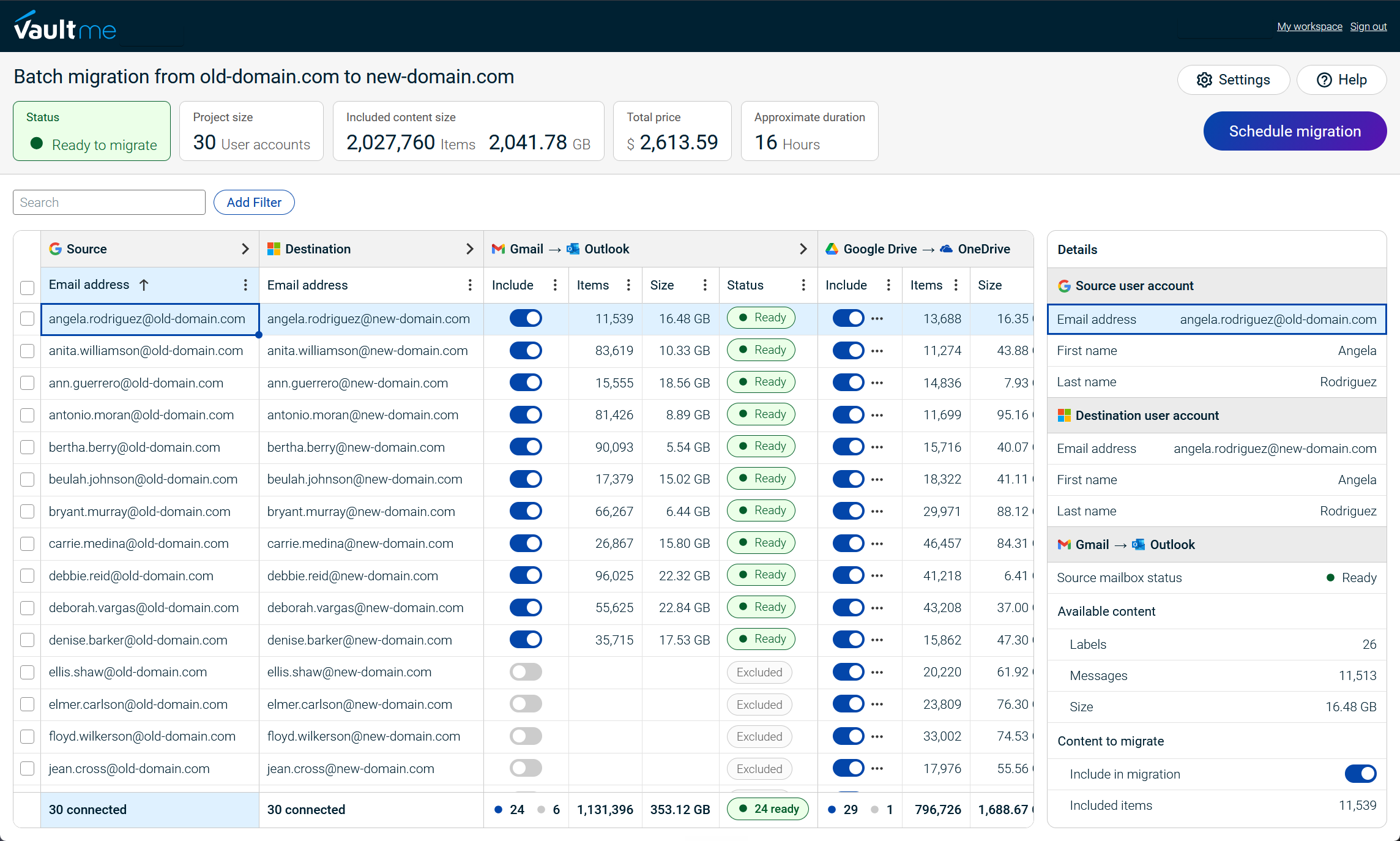
VaultMe is a migration tool specializing in migrations between Google Workspace and Microsoft 365 accounts. Typical scenarios include migrations from Google Workspace to Microsoft 365, from personal Microsoft 365 accounts to Microsoft 365 for Business, and Microsoft 365 tenant-to-tenant migrations.
Rather than supporting the widest possible range of cloud platforms, VaultMe focuses on helping organizations preserve business content as faithfully as possible.
Migration approach
VaultMe approaches migration as the preservation of business content rather than simply copying data between platforms. Its objective is to preserve emails, files, calendars, and contacts as completely and naturally as possible within the capabilities of the destination platform.
Additionally, rather than treating email, files, calendars, and contacts as separate migration projects, it migrates all supported types of business content as part of a single workflow.
Preparation is an integral part of the workflow. Before a migration starts, VaultMe validates project configuration to identify common issues such as missing permissions, insufficient storage, or account configuration problems that could prevent the migration from completing successfully.
Key strengths
- Specialization in Microsoft 365 migrations.
- Business content preservation philosophy.
- Complete migration workflow that minimizes content selection decisions.
- Extensive pre-migration checks.
- Journey-based documentation, in-product guidance, context-aware AI assistance, and human support.
Best suited for
VaultMe is best suited for mid-sized businesses migrating to Microsoft 365 that prioritize preserving business content in its entirety, reducing migration risk through thorough preparation, and providing administrators with guidance throughout the migration process. It is particularly suitable for organizations that perform migrations occasionally rather than maintaining dedicated migration specialists.
VaultMe is tailored to small to mid-sized migrations of roughly 5-500 accounts, making it a strong fit for organizations that want a focused migration solution.
To learn more about how VaultMe can help you with your migration, see VaultMe: Microsoft 365 migration.
Customer feedback
Read verified VaultMe user reviews on Capterra.

CloudM
What it is
CloudM is a user and data management platform that includes migration capabilities alongside tools for onboarding, offboarding, directory synchronization, and user lifecycle management. It has strong roots in Google Workspace administration while also supporting Microsoft 365.
Migration approach
Unlike migration-only products, CloudM positions migration as one component of a broader workspace management platform. Its migration workflows integrate with ongoing administration processes, making it suitable for organizations that manage users throughout their lifecycle rather than only during migration projects.
Key strengths
- Integrated workspace lifecycle management.
- Migration combined with onboarding and offboarding workflows.
- Personalized onboarding process with consultation to understand organizational requirements.
- Suitable for organizations already using CloudM's administration capabilities.
Best suited for
CloudM works best for organizations looking for a broader workspace management platform where migration is one part of ongoing user lifecycle management, particularly those with significant Google Workspace environments.
See how VaultMe compares to CloudM: VaultMe vs CloudM.
Customer feedback
Read verified CloudM user reviews on Capterra.
MigrationWiz
What it is
MigrationWiz, developed by BitTitan, is one of the most established cloud migration platforms. It has been widely adopted by enterprises and managed service providers and supports a broad range of migration scenarios across multiple platforms.
Migration approach
MigrationWiz emphasizes flexibility and extensive configuration. Rather than prescribing a particular migration workflow, it provides administrators with numerous configuration options that can be adapted to different migration scenarios and project requirements. Its licensing model allows organizations to select licenses based on the workloads and migration types required.
Key strengths
- Mature migration platform with a long track record.
- Broad support for migration workloads and platforms.
- Widely adopted by managed service providers.
- Extensive configuration options for complex migration projects.
Community reviews frequently highlight its flexibility and broad platform support. At the same time, some users report that the large number of configuration options results in a steeper learning curve.
Best suited for
MigrationWiz is best suited for experienced IT teams, enterprises, and managed service providers that require support for diverse migration scenarios and value configuration flexibility.
See how VaultMe compares to MigrationWiz: VaultMe vs BitTitan MigrationWiz.
Customer feedback
Read verified MigrationWiz user reviews on Gartner.
Movebot
What it is
Movebot is a cloud migration platform designed to migrate data between a wide range of cloud storage and productivity platforms. Its primary differentiator is the breadth of platforms it supports.
Migration approach
Movebot focuses on enabling organizations to migrate content across numerous cloud ecosystems through a single platform. It has a particularly strong emphasis on file migrations while also supporting email migrations, making it suitable for organizations consolidating content across different cloud services.
Key strengths
- Broad platform support.
- Strong focus on file migration.
- Suitable for cloud consolidation and multi-platform migration projects.
Best suited for
Movebot works best for organizations migrating file data across multiple cloud platforms, particularly those with significant file migration requirements or projects involving less common cloud storage providers such as Egnyte.
See how VaultMe compares to Movebot: VaultMe vs Movebot.
Customer feedback
Read verified Movebot user reviews on Capterra.
Alternatives to paid third-party migration tools
This guide focuses on third-party migration tools because they typically provide the broadest range of migration scenarios, more consistent migration workflows, and richer capabilities for preparation, verification, reporting, and administrator guidance. However, they are not the only option.
Microsoft also offers a collection of native migration tools. It recommends different tools depending on the source environment and the type of content being migrated.
-
The primary advantage: the tools are free to use.
-
The trade-off: they provide limited support. When issues occur, administrators often need to troubleshoot them independently using Microsoft documentation and community resources. Error messages may also be generic, making it difficult to identify the underlying cause of a problem.
Native tools can be an effective choice for straightforward migration projects. However, organizations migrating very large user accounts or undertaking more complex migration projects often choose third-party migration platforms that provide dedicated migration support, more detailed reporting and diagnostics, and workflows designed specifically for large-scale migrations.
We discuss pros and cons of free tools in the following article: Office 365 Migration Tools: How to Migrate to Microsoft.
Selecting the right tool for your project
Every migration project has different requirements. The table below summarizes which tools are generally the best fit for common migration scenarios and organizational priorities discussed throughout this guide.
| If your priority is… | Recommended tool(s) | Why |
|---|---|---|
| Google Workspace to Microsoft 365 migration | VaultMe | Built specifically for migrations involving Google Workspace and Microsoft 365. |
| Microsoft 365 tenant-to-tenant migration | VaultMe, MigrationWiz | VaultMe is purpose-built for migrations involving Microsoft 365 accounts, including Microsoft 365 tenant-to-tenant projects. MigrationWiz is a mature migration platform with a long track record supporting Microsoft 365 migrations in enterprise environments. |
| Migration from personal to business Microsoft 365 accounts | VaultMe | VaultMe fully supports migration of emails, files, contacts, and calendars from personal to business accounts. |
| File migration from multiple storage platforms | Movebot | Extensive support for cloud storage providers and file migration scenarios. |
| User lifecycle management features | CloudM | Comprehensive user lifecycle management, including onboarding, offboarding, directory synchronization, and workspace administration. |
| Small to medium-sized migration projects | VaultMe | Built for migrations of roughly 5-500 accounts. |
| Large migration projects | MigrationWiz, CloudM, Movebot | Built for large-scale environments. |
| Ongoing migrations and synchronizations throughout the year | CloudM | Better suited to organizations performing migrations as part of ongoing operations or managed services. |
| One migration workflow for all types of content | VaultMe, CloudM | Migrate email, files, calendars, and contacts within a single migration project. |
| Focus on preparation, not troubleshooting | VaultMe | Strong emphasis on preparation and surfacing any blockers early. |
| Paying only for what you migrate | VaultMe, Movebot | Usage-based pricing charges only for the users and content actually migrated. There are no migration licenses to purchase or assign in advance. |
Related articles
Planning an Office 365 migration? Learn how to do that efficiently: Office 365 Migration Tools: How to Migrate to Microsoft.
Need to select a mailbox migration tool for the upcoming project? Explore your options: Best Email Migration Tools and Services for IT Admins.
Need to migrate user content after a merger or acquisition? Learn how to do that: Best Cloud Migration Tools for Mergers and Acquisitions.
Overwhelmed by the choice of mailbox migration tool? Use VaultMe's guide to choose the tool that fits your project: Best Email Migration Tools for IT Admins Compared.
Need to migrate user accounts to Office 365? Learn what options are available: Best Way to Migrate Email Accounts to Office 365.