Best Google Workspace Migration Tools for IT Administrators
Organizations migrate to Google Workspace for many reasons. Some are moving from Microsoft 365, while others are consolidating accounts after a merger or acquisition, or onboarding and offboarding users. Although these projects all share the goal of migrating email, files, contacts, and calendars, they often have very different technical and operational requirements.
Over time, vendors have taken different approaches to solving migration challenges. These differences go far beyond the list of supported features. They influence how migration projects are planned, how administrators configure them, how issues are resolved, and ultimately which projects each product is best suited to support.
As a result, there's no "best" Google Workspace migration solution.
Rather than comparing products feature by feature, this guide explores the different migration philosophies behind today's leading Google Workspace migration tools. Understanding these approaches will help you identify the type of solution that best matches your migration project before evaluating individual products.
In this guide, we'll examine five distinct types of tools for migrating to Google Workspace:
- Tools specializing in Google Workspace migrations
- Tools supporting Google Workspace migrations
- Tools supporting many cloud platforms
- Tools for workspace management
- Google's native migration services
- Tools specializing in Google Workspace migrations
- Tools supporting Google Workspace migrations
- Tools supporting many cloud platforms
- Tools for workspace management with migration capabilities
- Google's native migration services
- Comparison table for the five approaches to Google Workspace migration
- Common mistakes when selecting a Google Workspace migration tool
- Google Workspace migration tools comparison table
- Conclusion
- Related articles
Tools specializing in Google Workspace migrations
Not all migration vendors try to support every cloud platform or migration scenario. Some instead focus on becoming experts in a small number of productivity ecosystems, investing their development efforts in understanding platform-specific behaviors, limitations, and migration edge cases.
This specialization allows these tools to optimize the Google Workspace migration experience. Because development is concentrated on these ecosystems, they can also support migration scenarios that broader migration platforms may consider niche, such as migrations from personal Google or Microsoft accounts.
The trade-off: Narrower scope. Organizations migrating from less common source systems or requiring support for a wide variety of enterprise content types may need a platform with broader capabilities.
Representative product: VaultMe
VaultMe follows this philosophy by specializing in Google Workspace migrations. Typical scenarios include migrating from Microsoft 365 to Google Workspace, from Google Workspace to Google Workspace, and from personal Gmail and Outlook accounts to Google Workspace.
During a Google Workspace migration, VaultMe focuses on preserving business content as naturally as possible. Rather than simply copying emails, files, calendars, and contacts, it aims to preserve their organization, context, and completeness, allowing users to continue working with familiar business content after the migration.
VaultMe also provides a more consistent migration workflow. Rather than requiring administrators to choose separate migration processes for emails, files, calendars, and contacts, it treats migration as a single project that covers all supported types of business content.
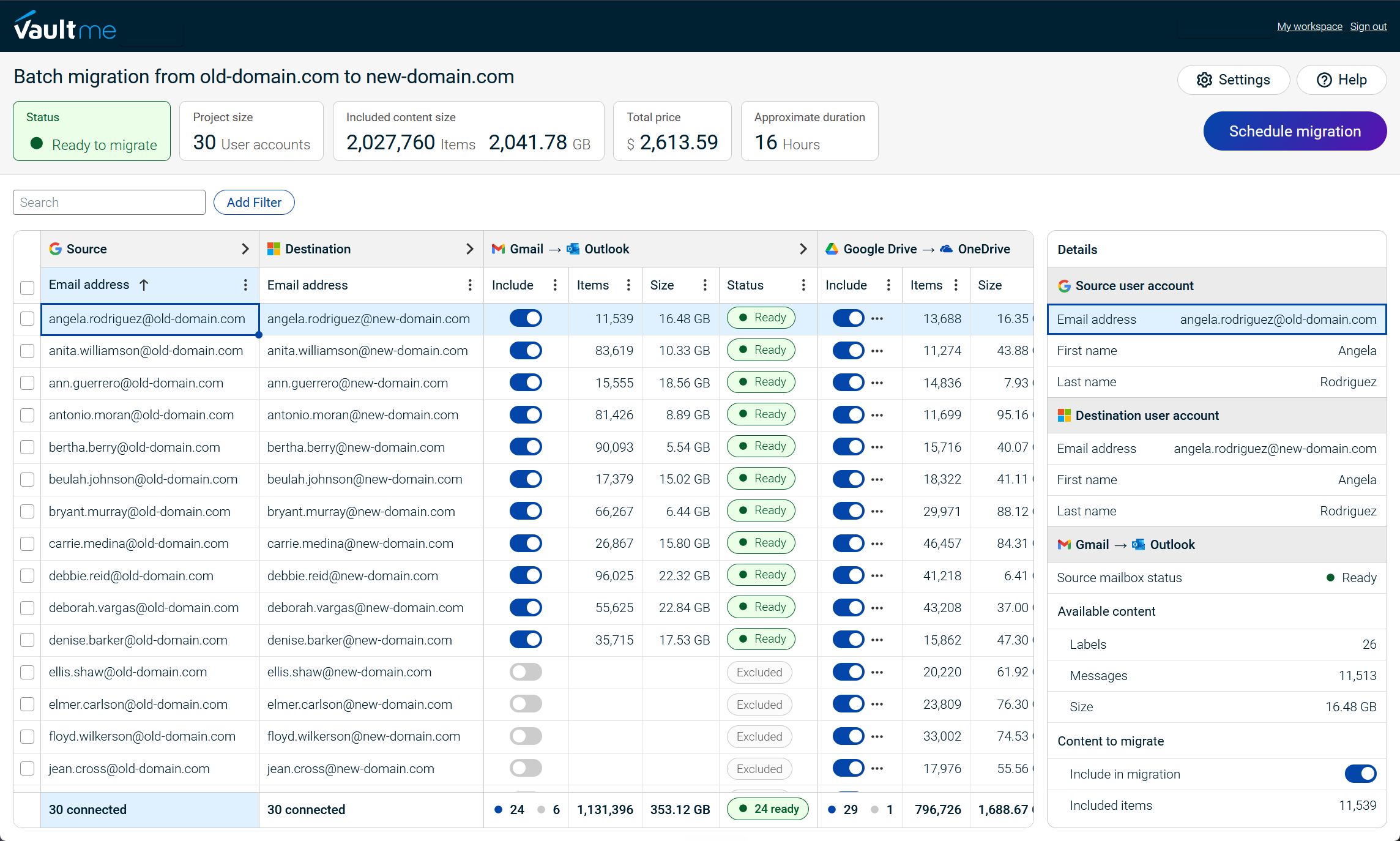
Documentation, preparation, and migration guidance are likewise optimized for Google Workspace.
This approach makes it particularly well-suited for organizations whose migration projects are centered on Google Workspace rather than on diverse enterprise migration scenarios.
Learn more about how VaultMe can help you with your Google Workspace migration: VaultMe: Google Workspace migration tool.

Tools supporting Google Workspace migrations
Rather than specializing in Google Workspace migrations, some vendors build products around other migration specializations while also supporting Google Workspace. For these products, Google Workspace is one of several supported migration paths rather than the primary focus of the platform.
This approach allows organizations to use the same migration platform across a wider variety of projects. Administrators can rely on familiar workflows, licensing, and operational processes instead of introducing a separate tool whenever a Google Workspace migration is required. For managed service providers and enterprises handling diverse migration projects, this can simplify tool selection and staff training.
The trade-off: Google Workspace is not the product's primary focus. Product development, documentation, and migration workflows are designed to serve a broader range of migration scenarios rather than optimize every aspect of the Google Workspace migration experience. As a result, less common Google Workspace edge cases may receive less attention. Similarly, support teams must maintain expertise across many migration platforms and scenarios, which may limit the depth of guidance available for highly specialized Google Workspace migration issues.
Representative product: MigrationWiz
MigrationWiz is one of the most mature products in this category. Originally built for Microsoft migration projects, it has evolved over the years to additionally support Google Workspace alongside its primary specialization.
Today, Google Workspace migrations form part of a broader migration platform that covers a wide range of Microsoft workloads and related migration scenarios.
Learn more about how VaultMe compares to MigrationWiz: VaultMe vs BitTitan MigrationWiz.
Tools supporting many cloud platforms
Some migration tools prioritize compatibility with as many cloud platforms as possible. Rather than focusing on a particular productivity suite or supporting a broad range of content types, these products aim to connect organizations with the widest possible selection of cloud storage services.
This approach is particularly valuable for organizations merging cloud environments or migrating file data from less common platforms. In addition to Google Workspace, these tools often support services such as Dropbox, Box, Egnyte, Amazon S3, Azure Blob Storage, Wasabi, and many others.
Because platform breadth is the primary objective, these tools often place a stronger emphasis on file migrations than on collaboration features or platform-specific user experiences. They are particularly well suited for cloud consolidation projects, mergers and acquisitions, and organizations managing content distributed across multiple cloud storage providers.
The trade-off: Supporting dozens of platforms requires development effort to be spread across many different integrations. As a result, these tools typically place greater emphasis on broad compatibility than on deeply optimizing the migration experience for any particular platform or ecosystem.
Representative product: Movebot
Movebot is an example of this approach. Its primary strength is broad cloud platform compatibility, allowing organizations to migrate content between dozens of cloud storage and productivity services. This makes it particularly well suited for organizations that regularly migrate content from a wide variety of source platforms to Google Workspace.
Learn more about how VaultMe compares to Movebot: VaultMe vs Movebot.
Tools for workspace management with migration capabilities
Some organizations view migration as just one stage in the lifecycle of a user account. Rather than building a product exclusively for migration projects, workspace management platforms combine migration capabilities with user provisioning, onboarding, offboarding, directory synchronization, and ongoing workspace administration.
This approach is particularly valuable for organizations that regularly create, modify, and remove user accounts. Instead of treating migration as an isolated project, it becomes part of a broader workflow for managing users throughout their time in the organization. As a result, administrators can perform migration and user lifecycle tasks within the same platform.
The trade-off: Migration is only one component of a much broader product. Development effort is shared across workspace management capabilities, so organizations looking exclusively for a migration solution may find themselves evaluating features they do not need. These platforms are generally best suited to organizations that expect long-term value from the broader administration capabilities in addition to migration.
Representative product: CloudM
CloudM exemplifies this approach by combining migration with user lifecycle management. Alongside migration capabilities, it provides tools for onboarding, offboarding, directory synchronization, backup, and workspace administration. Its consultative onboarding process also reflects this philosophy, helping organizations assess how migration fits into their broader workspace management requirements before implementation.
Learn more about how VaultMe compares to CloudM: VaultMe vs CloudM.
Google's native migration services
Rather than using a third-party migration product, some organizations choose to migrate using Google's own tools. These services are included with Google Workspace subscriptions and are intended to help organizations migrate common content types from supported source platforms.
Because they are developed by Google, these tools integrate directly with Google Workspace administration and require no additional software licensing. For organizations whose migration requirements match Google's supported scenarios, they provide a straightforward way to migrate users into Google Workspace using built-in functionality.
The trade-off: Limited functionality and support. Google's migration services are designed to support specific migration scenarios. Since they are included with Google Workspace at no additional cost, they do not include dedicated migration support. Organizations are expected to rely on Google's documentation and general Workspace support resources when planning and troubleshooting migrations.
Representative product: Google Workspace Migrate & Data Migration Service.
Rather than offering a single migration platform, Google provides several native migration tools, each designed for a specific type of migration. Data Migration Service focuses primarily on email migrations from supported platforms, while Google Workspace Migrate is intended for larger enterprise projects involving on-premises content sources. Together, they cover many common migration scenarios into Google Workspace. However, because these tools are designed for specific use cases, organizations with more complex requirements or a need for dedicated migration support may find that a third-party migration tool is a better fit.
Learn more about how free tools compare to paid third-party services: Google Workspace Migration: VaultMe's How-to Guide.
Comparison table for the five approaches to Google Workspace migration
| Approach | Best suited for | Main advantage | Main trade-off | Representative product |
|---|---|---|---|---|
| Tools specializing in Google Workspace migrations | Organizations whose migration projects primarily involve Google Workspace | Optimized specifically for Google Workspace migrations | Less suitable if the organization needs one tool for multiple unrelated migration projects | VaultMe |
| Tools with Google Workspace support | Organizations already using a migration platform with a different primary specialization | Use the same migration platform for occasional Google Workspace projects | Google Workspace is not the product's primary focus | MigrationWiz |
| Tools supporting many cloud platforms | Organizations migrating between many different SaaS and cloud storage platforms | Broad cloud platform coverage | Less optimization for any individual ecosystem | Movebot |
| Tools for workspace management | Organizations already using a workspace administration platform | Migration integrated with ongoing administration | Migration is one capability within a larger management platform | CloudM |
| Google's native migration services | Organizations whose migration requirements match Google's supported scenarios | Included with Google Workspace at no additional cost. | Limited supported scenarios and no dedicated migration support | Data Migration Service, Google Workspace Migrate |
Common mistakes when selecting a Google Workspace migration tool
With so many migration tools available, it's easy to compare products based on a single characteristic, such as price or the number of supported platforms.
In practice, successful migration projects depend on choosing a tool that matches your organization's priorities, technical requirements, and internal expertise.
Here are some of the most common mistakes to avoid.
-
Comparing feature lists instead of migration experience created by the tool
Many migration tools support the same Google Workspace types of content, such as Gmail, Drive, Contacts, and Calendars. On paper, their feature lists may appear nearly identical. In practice, however, they often take very different approaches to the migration experience.
For example, VaultMe and CloudM migrate supported content types as part of a single migration workflow, while MigrationWiz and Movebot treat different workloads as separate migration projects.
Products also differ in how they help administrators prepare for a migration. VaultMe performs an obligatory pre-migration scan that identifies common configuration issues before any content is copied, allowing administrators to resolve problems early. Other tools typically place greater emphasis on post-migration verification and troubleshooting.
Administrator guidance also varies considerably. VaultMe provides in-app suggestions and context-aware AI assistance directly within the migration interface, whereas some other products primarily rely on documentation and knowledge base articles to explain features and troubleshoot issues.
Rather than comparing only which types of content are supported, consider how the migration is planned, configured, and monitored.
-
Not accounting for your team's experience
The most capable migration platform isn't always the best choice. Different products are designed with different assumptions about the people using them.
For example, MigrationWiz and Movebot assume that administrators are already familiar with migration concepts and are comfortable selecting the appropriate migration type, configuration, and settings for each project. Their documentation is primarily organized around features and individual migration scenarios.
In contrast, VaultMe is designed for administrators with little or no prior migration experience. It guides users through the setup process, provides context-aware AI assistance throughout the setup, and performs mandatory pre-migration checks to identify common issues before the migration begins.
Choose a product that matches your team's experience as well as the complexity and frequency of your migration projects. A tool designed for experienced migration specialists assumes a high level of migration knowledge, while another may provide guidance throughout setup, validation, and verification.
-
Not accounting for the size of the migration project
Migration tools are often designed with a particular project size in mind. A solution that works well for a migration of 20 users may not provide the features needed for a migration involving thousands of accounts. Conversely, an enterprise migration platform may introduce unnecessary complexity for a small organization with straightforward migration requirements.
When evaluating migration tools, consider not only the number of users to be migrated, but also how the migration will be managed. Large projects often involve multiple migration stages, several administrators, and stricter coordination requirements than smaller migrations. Choosing a tool that matches the scale of your project can significantly reduce both administrative effort and migration risk.
-
Choosing based only on price
The service price is only one part of the total cost of a migration project. Time spent learning the platform, configuring migrations, resolving issues, consulting documentation, or manually completing unsupported tasks can easily outweigh any savings on the service price.
For example, a lower-cost or free migration tool may require administrators to invest more effort in planning, troubleshooting, or post-migration verification. A commercial migration tool may reduce the overall effort required to complete the project, even if its purchase price is higher.
When evaluating migration tools, consider the total cost of the migration: not just the service price, but also the time, expertise, and operational effort required to complete the project successfully.
-
Ignoring migration support availability and quality
Migration projects may turn out to be more complex than initially estimated. Before selecting a tool, consider what kind of support is available if you expect to have questions.
It's also worth researching the quality of support before committing to a migration platform. Review sites such as Capterra, as well as discussions on Reddit and other IT community forums, can provide valuable insight into how responsive vendors are, how effectively they resolve migration issues, and what the support experience is like in practice. This real-world feedback can be just as important as the product's feature list.
Google Workspace migration tools comparison table
| Evaluation criteria | VaultMe | MigrationWiz | Movebot | CloudM | Google native tools |
|---|---|---|---|---|---|
| Primary focus | Google Workspace migrations | Microsoft 365 specialization with Google Workspace support | Cloud migrations from over 30 different source platforms; primarily file migrations | User management with data migration capabilities | Google Workspace migrations |
| Project size | Small to medium (roughly 5-500 accounts) | Mid-size to enterprise | Small to enterprise | Mid-size to enterprise | Mid-size to enterprise |
| Supported source platforms | Google Workspace and Microsoft 365 specialization, with full support for related scenarios such as IMAP and Exchange | Microsoft 365, Google Workspace, Exchange, IMAP, offline archives, Teams, public folders, and others | Broad source platform coverage with over 30 platforms supported | Broad source platform coverage with over 20 platforms supported | Microsoft 365, Exchange, IMAP, Google Workspace, cloud file storage systems, and other sources |
| Migration workflow | Supports migrating all types of content in one workflow | Has separate workflows for different types of content | Has separate workflows for different types of content | Supports migrating all types of content in one workflow | Has separate workflows for different types of content |
| Pre-migration scan | Central to the setup. The tool prioritizes preparation | Optional. The tool prioritizes migration launch and post-migration verification | Optional. The tool prioritizes migration launch and post-migration verification | Optional. The tool prioritizes migration launch and post-migration verification | Optional. The tool prioritizes migration launch and post-migration verification |
| Expected administrator experience | Assumes little to no Google Workspace migration experience | Assumes pre-existing Google Workspace migration experience | Assumes pre-existing Google Workspace migration experience | Assumes pre-existing Google Workspace migration experience | Assumes pre-existing Google Workspace migration experience |
| Support channels | Documentation built around a user journey. In-app instructions and suggestions. Context-aware AI assistance. Human support. | Extensive technical documentation built around features. Human support. | Documentation built around features. Human support. | Documentation built around features. Human support. | Documentation built around features. Community support. |
| Best suited for | Projects involving migrations to Google Workspace with a focus on thorough preparation, clarity throughout the setup process, and complete preservation of business content | Projects run by enterprises and managed service providers supporting a wide variety of migration scenarios and workloads | Projects involving consolidating cloud storage or migrating content across numerous cloud platforms | Projects where migration is part of ongoing user lifecycle and workspace administration | Projects with straightforward migration requirements that closely match Google's supported migration paths |
Conclusion
There is no single "best" Google Workspace migration tool for every organization. The choice depends on the type of migration you're performing, your team's experience, and the role migration plays within your organization. Once those priorities are clear, selecting the right tool becomes much simpler.
Rather than starting with feature lists or pricing, first identify the approach that best matches your migration project. Organizations migrating primarily between Google Workspace and Microsoft 365 may benefit from a specialized solution, while those managing diverse migration scenarios, multiple cloud platforms, or ongoing user lifecycle operations may find greater value in a different type of product.
By understanding the strengths, trade-offs, and intended purpose of each approach, you can evaluate migration tools in the context of your own requirements instead of searching for a universal winner. The best Google Workspace migration tool is ultimately the one that enables your organization to complete its migration reliably, efficiently, and with the least operational effort.
Related articles
Planning a Google Workspace migration? Learn what you need to do step by step: Google Workspace Migration: VaultMe's How-to Guide.
Want to migrate user content from one Google Workspace to another? Use VaultMe's detailed guide: Transfer Google Workspace to Another Account: Migration Guide.
Need to migrate Outlook accounts to Google Workspace? Learn what options you have: Google Workspace Migration for Microsoft Outlook.
Need to select a mailbox migration tool for the upcoming project? Explore your options: Best Email Migration Tools and Services for IT Admins.
Not sure which email migration tool to use? Learn what affects the choice: Best Email Migration Tools for IT Admins Compared.