Best MigrationWiz Alternatives
MigrationWiz is a configurable migration platform for administrators and service providers managing mailbox, document, and other migration workloads. Its project-based model offers detailed control, but it also requires the migration team to select the appropriate licenses, configure individual workloads, and coordinate them across the project.
Several alternatives organize this work differently. VaultMe brings related business content into one preparation-first migration journey. CloudM combines complex migration delivery with broader workspace management. Movebot specializes in file-led, multi-platform data transfers. MailJerry provides a downloadable mailbox migration tool with a limited free version. Google’s and Microsoft’s native services may cover straightforward migrations into their respective platforms without another commercial tool.
MigrationWiz may still be the right choice for teams that value workload-level control and have the experience to manage it. This guide compares MigrationWiz and its alternatives by the practical demands they place on the administrator, helping organizations select a tool before purchasing or beginning a migration.
- The right MigrationWiz alternative for your migration goal
- How MigrationWiz organizes a migration
- When MigrationWiz remains the right choice
- Choose VaultMe to replace separate projects with one workflow
- Choose CloudM for enterprise planning and managed delivery
- Choose Movebot when files dominate the project
- Choose MailJerry for a downloadable mailbox migration tool
- Choose native services to avoid a separate migration platform
- MigrationWiz alternatives compared by project requirements
- Conclusion
- Frequently asked questions
- Related articles
The right MigrationWiz alternative for your migration goal
A single requirement may be supported by several migration tools. The important difference is how each one addresses it and how much planning, configuration, and coordination remains with the administrator.
Use the table below to identify the tools that may fit your main migration goal. The final column explains the operating-model differences that can help narrow the shortlist.
| If you want to… | Tools to consider | Important distinction |
|---|---|---|
| Run an email-only migration | VaultMe, MailJerry, MigrationWiz, CloudM, native services | MailJerry specializes in email-only migration, while the other tools support it as one project type |
| Manage email, files, calendars, and contacts as one migration | VaultMe, CloudM | VaultMe emphasizes a guided, focused migration; CloudM supports this within a broader enterprise platform |
| Identify account and configuration problems before launch | VaultMe | VaultMe makes readiness checks central to setup |
| Connect migration to a larger workspace management program | CloudM | Migration can be combined with enterprise services and continuing administration |
| Prioritize extremely large or complex file transfers | Movebot, CloudM | Movebot is file-led, and CloudM targets complex enterprise projects |
| Migrate personal Google or Microsoft accounts | VaultMe, MailJerry, selected native services | VaultMe and MailJerry support personal accounts in additional to business ones, while other tools focus primarily on business accounts |
| Avoid purchasing a separate migration tool | Google and Microsoft native services | Built-in services may cover straightforward migrations into their respective environments |
| Retain granular project configuration | MigrationWiz, CloudM, Movebot | MigrationWiz provides detailed settings for separately configured workloads; CloudM applies extensive controls across complex enterprise migrations; Movebot concentrates its controls on file mapping, selection, transformation, and transfer behavior |
How MigrationWiz organizes a migration
MigrationWiz divides migration work into projects based on the type of content being transferred. For example, mailbox and document migrations are configured as separate workloads, with their own setup requirements, mappings, settings, and licenses.
This structure allows experienced administrators to control each workload independently. A migration team can apply different filters, schedules, and migration passes to mailboxes and files or run only the workloads required for a particular customer.
The trade-off is additional coordination. When a project includes several types of business content, the administrator may need to:
- Determine which MigrationWiz project and license types are required.
- Configure source and destination endpoints for each workload.
- Maintain consistent user mappings across projects.
- Coordinate migration passes and cutover timing.
- Monitor and reconcile results from separate processes.
- Confirm that every required content type is covered.
This operating model works well for MSPs and migration specialists with established processes. It may be less convenient for an occasional administrator who sees a user’s email, files, calendars, and contacts as one migration rather than a collection of technical workloads.
When MigrationWiz remains the right choice
MigrationWiz is well suited to experienced IT teams and migration providers that manage varied source systems and want detailed control over project scope, filters, scheduling, and execution. Its workload-specific projects can be an advantage when mailboxes, documents, and other content need to be planned and operated independently.
Use MigrationWiz when:
- Experienced administrators will plan and operate the migration.
- The team already has established MigrationWiz processes and documentation.
- Mailbox and document workloads need to be controlled independently.
- Different workloads require separate schedules, filters, or migration passes.
- An MSP manages varied customer environments through a familiar platform.
- The project involves Microsoft 365, Exchange, IMAP, or other supported business systems.
- Workload-specific licensing aligns with the project’s scope.
MigrationWiz may be the right choice when the team is comfortable coordinating separate projects and values detailed workload control.
An alternative may be more suitable when the organization wants to reduce that coordination, provide more guidance to less-experienced administrators, prioritize a particular content type, or use a different migration process.
Choose VaultMe to replace separate projects with one workflow
VaultMe specializes in migrations involving Google Workspace and Microsoft 365. It also supports email migrations to and from Exchange and IMAP-compatible systems.
VaultMe is the most direct alternative when the main concern is coordinating separate MigrationWiz projects for related business content.
Instead of asking administrators to organize email, files, calendars, and contacts as distinct technical workloads, VaultMe groups them around the accounts being migrated. Preparation, user mapping, readiness checks, execution, and monitoring take place within one coordinated workflow.
This changes the administrator’s role. With MigrationWiz, the team designs and coordinates the migration process. VaultMe provides more of that structure, guiding the administrator through the project and identifying potential access, storage, licensing, and configuration problems before launch.
VaultMe may be a better fit when:
- The project involves Google Workspace or Microsoft 365, including migrations from personal Google or Microsoft accounts.
- Using admin authorization is not possible and accounts need to be connected individually.
- The administrator wants guidance during planning, setup, and execution.
- The migration includes not only email, but also files, calendars, or contacts.
- The administrator wants to manage all supported content types in one workflow instead of configuring separate jobs.
- Identifying and resolving access, permissions, storage, and configuration issues before launch is a priority.
- The goal is to prepare thoroughly so that, after launch, the administrator can focus primarily on monitoring rather than troubleshooting.
- The project is self-service, but user journey-based documentation, in-app guidance, AI assistance, and human support are important.
The trade-off is narrower platform coverage and less emphasis on granular workload configuration. MigrationWiz may remain preferable for specialists managing diverse or highly customized environments.
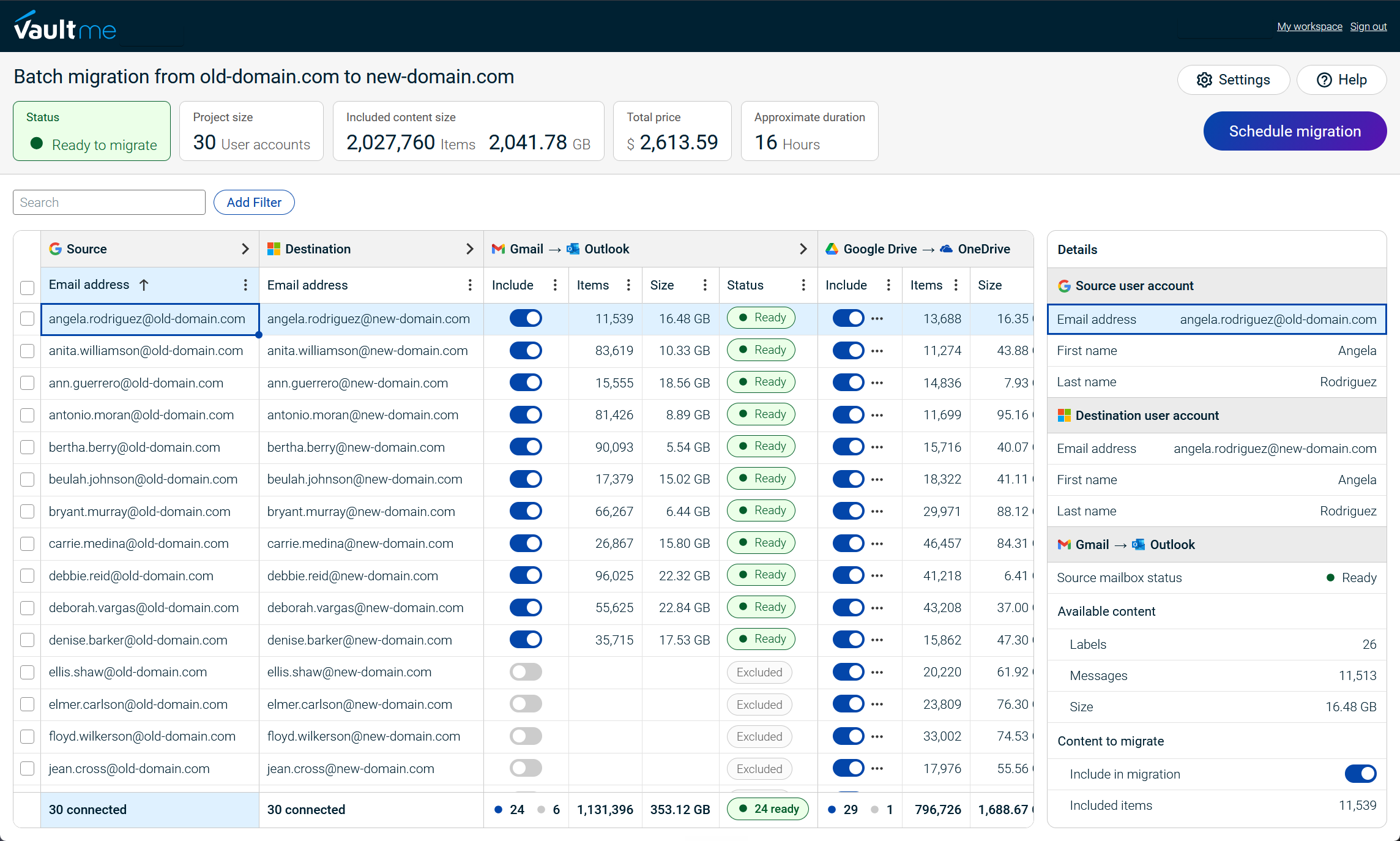
See how VaultMe compares to MigrationWiz: VaultMe vs BitTitan MigrationWiz.
Read verified user reviews on Capterra: VaultMe reviews.

Choose CloudM for enterprise planning and managed delivery
CloudM is a MigrationWiz alternative for organizations that need more than a self-managed migration tool. CloudM Migrate supports complex projects through discovery, detailed planning, deployment options, and access to migration specialists.
Like VaultMe, CloudM can organize multiple content types within one migration project. The difference is project context. VaultMe focuses on completing a defined migration, while CloudM is designed for larger enterprise environments and can connect migration with ongoing workspace management.
CloudM may be a better fit when:
- The migration is large, complex, time-sensitive, or business-critical.
- The organization wants professional assistance with execution.
- Mail, files, permissions, shared resources, and collaboration data must be coordinated.
- Hosted or self-hosted deployment is required.
- The organization also needs backup, archiving, offboarding, or continuing Workspace administration.
Compared with MigrationWiz, CloudM places greater emphasis on enterprise engagement and migration delivery. This may reduce the amount of project design handled entirely by internal administrators, although it can also introduce a more involved evaluation and procurement process.
CloudM is most compelling when the reason for replacing MigrationWiz is not a desire for simplicity, but a need for broader planning, specialist support, and long-term workspace management.
Choose Movebot when files dominate the project
Movebot is a strong MigrationWiz alternative when the project is defined primarily by file volume, storage complexity, or the number of source platforms involved.
Movebot may be a better fit when:
- Files represent the largest or most complex part of the project.
- The migration includes several cloud storage or on-premises platforms.
- Folder mappings, permissions, metadata, or file transformations require particular attention.
- Large data volumes must be transferred efficiently.
- An MSP needs one platform for varied storage migrations.
- Volume-based pricing fits the project better than workload-specific user licenses.
Movebot also supports mailbox migration, but its clearest differentiation from MigrationWiz is its specialization in broad file and data movement. Organizations should confirm whether its mailbox workflow covers every required content type and migration path.
Choose Movebot when document migration is not merely one part of the project but the main operational challenge. MigrationWiz may remain the better choice when mailbox migration is central and administrators prefer to control mail and documents as separate workloads.
Choose MailJerry for a downloadable mailbox migration tool
MailJerry is a specialized email migration tool available as an app for Windows, macOS, iOS, and Android.
Unlike the other commercial platforms in this comparison, it also provides a limited free version. The free version supports an unlimited number of mailbox migrations, but each mailbox is limited to 150 MB and only three migrations can run simultaneously. Paid monthly and annual subscriptions remove the data limit and increase the number of simultaneous migrations. Bulk migration is reserved for the annual plan.
MailJerry may be a good fit when:
- Only mailbox content needs to be transferred.
- A downloadable migration app is preferred.
- The migration involves Gmail, Microsoft 365, Exchange, or another IMAP-compatible provider.
- Subscription pricing for unlimited mailboxes and data suits the project.
- Files, calendars, contacts, and collaboration content are outside the project scope.
MigrationWiz, VaultMe, CloudM, Movebot, and native services can also support email-only migrations. MailJerry’s differentiator is its combination of mailbox specialization, downloadable apps, and a limited free tier, not exclusive support for email migration.
The trade-off is that MailJerry does not cover the wider business-content requirements handled by broader migration platforms. Organizations that also need to move files, calendars, contacts, permissions, or shared resources will require another process.
Choose native services to avoid a separate migration platform
Google and Microsoft provide migration services for moving supported content into Google Workspace and Microsoft 365. These services may replace MigrationWiz when the project is straightforward and closely matches a migration path supported by the destination provider.
Google’s data migration services support selected migrations into Google Workspace. Microsoft provides several approaches for moving mailboxes into Microsoft 365, including Exchange, Gmail, and IMAP migration paths.
Native services may be a better fit when:
- The destination is Google Workspace or Microsoft 365.
- The source is directly supported by the destination provider.
- Email is the main migration requirement.
- Avoiding third-party licensing is a priority.
- Internal IT can prepare, run, and troubleshoot the migration.
- Using different processes for different content types is acceptable.
The main trade-off is that eliminating a third-party tooldoes not eliminate migration work. Administrators must select the correct native service, prepare accounts, understand migration limits, monitor the transfer, and find another process for unsupported content.
Native services are most suitable when their boundaries match the project. If the migration requires several content types, cross-platform coordination, dedicated guidance, or an unusual source system, a third-party alternative may reduce the burden on internal IT.
MigrationWiz alternatives compared by project requirements
| Criteria | MigrationWiz | VaultMe | CloudM | Movebot | Google and Microsoft native tools |
|---|---|---|---|---|---|
| Project type | Business email and other migration projects across multiple systems | Google Workspace and Microsoft 365 migrations involving email, files, calendars, and contacts; Exchange and IMAP email are also supported | Enterprise Google Workspace projects in which migration may be one part of a broader workspace initiative | Primarily file-transfer projects across many sources, with mailbox migration available as an additional capability | Straightforward migrations into Google Workspace or Microsoft 365 using a migration path supported by the destination provider |
| Tool specialization | Microsoft 365 | Google Workspace and Microsoft 365 | Google Workspace management | High-volume file transfers from more than 30 source platforms | Imports into the provider’s own platform |
| Project size | Small to enterprise | Small to medium-sized (roughly 5-500 accounts) | Large and complex enterprise projects | Small to enterprise | Small to enterprise, depending on the migration path and internal administrative capacity |
| Migration of personal accounts | Limited support via IMAP may be possible | Fully supported | Limited support via IMAP may be possible | Limited support via IMAP may be possible | Limited support; email import may be available for selected personal-account scenarios |
| Individual account connection without admin permissions | Not supported for Google Workspace and Microsoft 365 | Fully supported | Not supported for Google Workspace and Microsoft 365 | Not supported for Google Workspace and Microsoft 365 | Available in selected user-led import scenarios; administrator authorization is required for organization-wide migrations |
| Migration goals | Flexibility and support for many sources | Thorough preparation, early issue detection, managing all content types in one workflow | Enterprise planning, support, and ongoing workspace management | Flexible content transfer across a broad selection of sources | Avoid third-party licensing when the source and required content match a supported native migration path |
| Administrator migration experience required | Intermediate to advanced | Beginner to advanced | Advanced; typically enterprise IT teams or migration specialists | Intermediate to advanced | Intermediate to advanced; internal IT is responsible for planning, configuration, and troubleshooting |
| Tool philosophy | Configure the project and launch the migration | Prepare thoroughly, identify potential issues, and launch only when the project is ready | Plan and execute migration as part of a broader enterprise workspace management engagement | Configure the project and launch the migration | Provide destination-specific migration processes for administrators to configure and operate |
| Support | Extensive technical documentation built around features. Human support. | Documentation built around a user journey. In-app instructions and suggestions. Context-aware AI assistance. Human support. | Documentation built around features. Human support. | Documentation built around features. Human support. | Technical documentation and community resources. Direct migration support is limited and varies by provider and subscription. |
Conclusion
MigrationWiz remains a strong option for experienced administrators and service providers that value workload-specific configuration across varied environments. However, its operating model will not suit every migration.
VaultMe reduces coordination by bringing related Google Workspace and Microsoft 365 content into one preparation-first workflow. CloudM fits complex enterprise projects that require specialist delivery or broader workspace management. Movebot is strongest when files and multi-platform data movement define the project. MailJerry provides a downloadable, email-focused option with a limited free version, while Google’s and Microsoft’s native services may be sufficient for straightforward migrations into their respective platforms.
Before choosing a tool, confirm the complete migration path, content scope, administrator experience, support requirements, and commercial model. The best MigrationWiz alternative is the one that makes the particular project easier to plan, operate, and complete.
Frequently asked questions
What is the best MigrationWiz alternative?
There is no universally best alternative. For Google Workspace and Microsoft 365 migrations, VaultMe is the most direct option in this comparison. CloudM may suit broader enterprise workspace projects, while Movebot may fit projects centered on high-volume file transfers.
Is VaultMe a good alternative to MigrationWiz?
Yes. VaultMe is a strong alternative for Google Workspace and Microsoft 365 migrations. It also supports email migrations involving Exchange and IMAP-compatible systems. Its approach emphasizes preparation, readiness checks, and guidance before launch.
Which MigrationWiz alternative is suitable for beginners?
VaultMe is suitable for beginner to advanced administrators. Its guided workflow and user journey-based documentation help administrators prepare, configure, and monitor a migration.
Which alternative is suitable for enterprise migration projects?
CloudM may suit enterprise projects in which migration is part of a broader workspace management initiative. Its process begins with a sales consultation and can include enterprise planning and support.
Which alternative supports the widest range of file-transfer sources?
Movebot supports file transfers from more than 30 source platforms. Mailbox migration is an additional capability rather than its primary specialization.
Do business email migration tools copy more than email?
Depending on the tool and migration path, they may also copy files, calendars, contacts, folders, permissions, and other business content. Support for each content type should be confirmed for the specific source and destination.
Related articles
Considering a Movebot alternative? Explore your options: Best Movebot Alternatives for Google Workspace Migrations.
Need to perform a Google Workspace migration? Learn what tools are available and how to choose a tool for your project: Best Google Workspace Migration Tools for IT Administrators.
Planning a Microsoft 365 migration? Learn about different tools and how to choose one for your specific situation: Best Microsoft 365 Migration Tools for IT Administrators.
Preparing for a merger or acquisition? Learn how you can consolidate email accounts: Best Cloud Migration Tools for Mergers and Acquisitions.
Need to transfer users from one domain to another? Learn how you can do that: Migrate Google Workspace Users Between Domains.
Need to migrate users from Google Workspace to Microsoft 365? VaultMe's guide provides useful recommendations: Best Way to Migrate Users from Google Workspace to Microsoft 365.