Best Movebot Alternatives for Google Workspace Migrations
Movebot is a strong option for file-heavy migrations involving many cloud platforms, but it may not be the best fit for every Google Workspace project.
This guide compares Movebot alternatives by use case, migration experience, and project requirements.
- What are Movebot alternatives for a Google Workspace migration?
- Movebot alternatives at a glance
- When Movebot is the right choice
- Why consider a Movebot alternative?
- How we evaluated the alternatives
- 1. VaultMe: Best for guided Google Workspace migrations
- 2. CloudM: Best for complex enterprise migrations
- 3. MigrationWiz: Best for highly configurable projects
- 4. Google’s native tools: Best for straightforward migrations to Google Workspace
- Movebot alternatives comparison table
- Which Movebot alternative should you choose?
- Frequently asked questions
- What is the best Movebot alternative for Google Workspace?
- Is VaultMe a direct replacement for Movebot?
- Which alternative is best for Google Workspace to Google Workspace migration?
- Which Movebot alternative supports personal Gmail accounts?
- Is there a free alternative to Movebot?
- Should I replace Movebot if the project is mainly a file migration?
- Related articles
What are Movebot alternatives for a Google Workspace migration?
The best Movebot alternative depends on why you need a different migration approach.
VaultMe is a strong option for guided Google Workspace and Microsoft 365 migrations involving roughly 5–500 accounts.
CloudM is better suited to complex enterprise projects and organizations that also need Workspace management capabilities.
MigrationWiz works well for experienced migration teams managing diverse workloads, while Google’s native services may be sufficient for straightforward, cost-sensitive migrations.
Movebot remains a strong choice for file-heavy projects spanning many cloud platforms.
Product capabilities were reviewed using vendor documentation and hands-on product experience. Details were last verified on 13 August, 2026.
Movebot alternatives at a glance
| Tool | Best for | Main trade-off |
|---|---|---|
| VaultMe | Guided Google Workspace and Microsoft 365 migrations of roughly 5–500 accounts | Limited support for platforms outside Google and Microsoft |
| CloudM | Complex enterprise migrations and ongoing workspace management | More complexity than smaller projects may require |
| MigrationWiz | Experienced IT teams and MSPs managing varied environments and content types | More complexity than smaller projects may require; different content types may require separate setup and licensing |
| Google’s native tools | Straightforward migrations where minimizing software costs is the priority | Limited migration scenarios and support |
Movebot remains a strong choice for file-heavy projects that involve many cloud storage platforms. The alternatives become more relevant when a project requires deeper Google Workspace specialization, a different migration workflow, or more extensive migration guidance.
When Movebot is the right choice
Movebot is a general-purpose cloud migration tool designed to migrate files across 30+ platforms.
Movebot is a particularly good fit when:
- The project involves several cloud storage platforms.
- Transferring large volumes of files is the main priority.
- An MSP manages varied migration scenarios for different clients.
Its broad platform coverage is especially useful for cloud consolidation projects involving services such as Dropbox, Box, or other storage systems. In these cases, using one platform for several migration paths can be more practical than selecting a specialized tool for each one.
Source: Movebot Google Workspace migrations.
A Movebot alternative becomes more relevant when the project is centered specifically on Google Workspace or Microsoft 365, and the priority is a unified workflow, platform-specific preparation, or more guided setup.
Why consider a Movebot alternative?
Movebot’s broad platform coverage is an advantage when a project involves several cloud services. However, a tool designed around narrower migration scenarios may provide a better experience for organizations focused specifically on Google Workspace.
A Movebot alternative may be more suitable when:
- The migration includes several types of business content. Some tools allow email, files, calendars, and contacts to be configured and monitored together rather than as separate workloads.
- The administrator needs more guidance. Teams with limited migration experience may benefit from step-by-step setup, contextual instructions, and assistance with Google Workspace requirements.
- Preparation is a priority. Platform-specific checks can identify problems involving account access, storage, licensing, permissions, and destination configuration before content is transferred.
- Personal Google accounts are involved. Not every business migration platform provides full support for personal-to-business or personal-to-personal migrations.
- The migration is simple enough for a native tool. For supported scenarios, Google’s own migration services may avoid the cost of a third-party platform.
The right alternative depends on what Movebot does not prioritize for the particular project. It should be selected based on migration scope, content types, administrator experience, and support requirements, not simply on the number of available features.
How we evaluated the alternatives
We evaluated each Movebot alternative based on its migration philosophy and the experience it creates for administrators. Rather than comparing feature lists, we examined how each tool approaches migration planning, setup, preparation, execution, and support.
The comparison considers:
- Supported source and destination platforms
- Support for personal Google accounts
- Migration workflow and readiness checks
- Guidance provided during setup
- Expected administrator experience
- Suitable project size
- Migration support and professional service options
The recommendations are therefore based on best-fit scenarios rather than an overall score.
1. VaultMe: Best for guided Google Workspace migrations
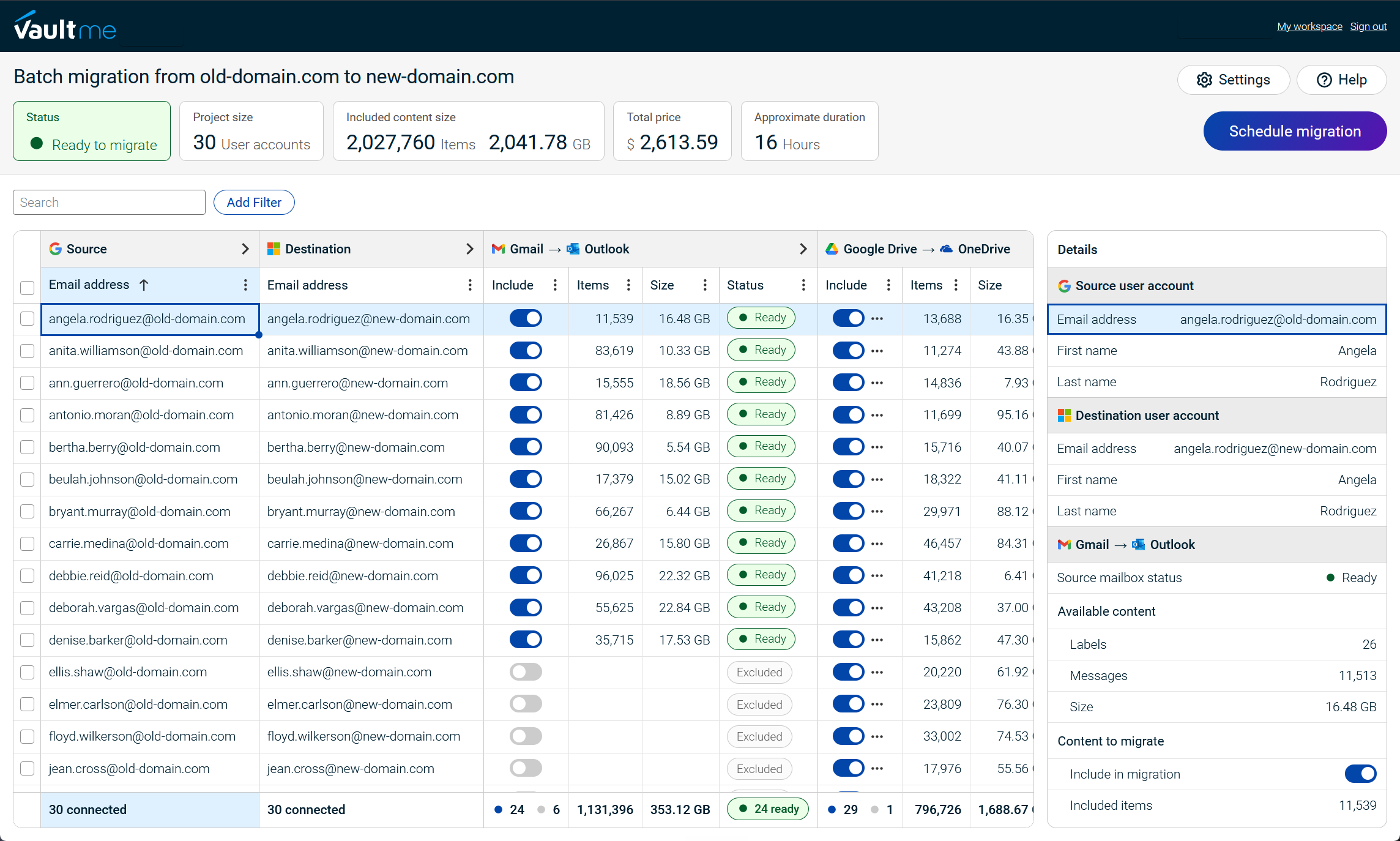
VaultMe is best suited to small and medium-sized migrations of roughly 5–500 accounts between Microsoft 365 and Google Workspace. It also supports migrations involving personal Gmail and Outlook accounts.
Unlike Movebot’s broad multi-cloud approach, VaultMe focuses on preserving business content within the Google and Microsoft ecosystems. Email, files, calendars, and contacts can be configured and migrated together in one workflow, reducing the need to manage separate projects for each content type.
VaultMe places particular emphasis on preparation. Before a migration begins, it checks account access, licensing, storage, and other platform-specific requirements that could affect the transfer. In-app guidance, migration playbooks, context-aware AI assistance, and human support are available throughout the process.
Choose VaultMe when:
- The project involves Google Workspace or Microsoft 365.
- You need to migrate approximately 5–500 accounts.
- Email, files, calendars, and contacts should be managed together.
- The administrator has limited migration experience.
- Personal Google or Microsoft accounts are involved.
- Identifying configuration problems before migration is a priority.
VaultMe is less suitable when a project involves many unrelated cloud storage platforms, legacy systems, or enterprise collaboration workloads outside Google Workspace and Microsoft 365. For those scenarios, Movebot or a broader enterprise platform may offer better coverage.
Learn more in the detailed VaultMe vs. Movebot comparison.
To learn more about how VaultMe can help you with your migration project, refer to Migrate to Google Workspace.
2. CloudM: Best for complex enterprise migrations
CloudM is designed for organizations managing complex or large-scale migrations to Google Workspace. It supports migrations from Microsoft 365, Google Workspace, Box, Dropbox, and other business platforms.
Organizations can manage the migration internally, use CloudM-hosted or self-hosted deployment, or engage CloudM specialists for planning and delivery.
CloudM also offers tools for Workspace backup, archiving, offboarding, and administration.
Choose CloudM when:
- The project involves complex Google Workspace workloads.
- Groups, Chat, Spaces, or resource calendars must be migrated.
- Professional migration services are required.
- Migration is part of a broader Workspace management strategy.
- A large project requires dedicated infrastructure or greater deployment control.
CloudM may introduce more complexity than a small or straightforward migration requires. Organizations focused on a guided self-service migration of a few hundred accounts may prefer a narrower tool.
Source: CloudM Google Workspace tenant-to-tenant migrations
3. MigrationWiz: Best for highly configurable projects
MigrationWiz is a cloud migration platform with a strong focus on Microsoft 365, Exchange, and related mailbox migration scenarios. It also supports migrations to Google Workspace, including transfers of email, calendars, contacts, files, and personal archives.
MigrationWiz is most relevant when a Google Workspace migration forms part of a broader Microsoft-centered migration program. An organization or service provider already using MigrationWiz for Exchange and Microsoft 365 projects can use the same platform for supported Google Workspace destinations.
MigrationWiz uses workload-specific projects and licenses. This provides flexibility, but administrators need to configure and manage mailbox and document migrations separately.
Choose MigrationWiz when:
- Google Workspace is one of several destinations managed by the migration team.
- Detailed configuration options are important.
- Mailbox migration is a central part of the project.
- Your team already understands migration planning and troubleshooting.
- You want a mature platform that supports many migration scenarios.
- Workload-specific projects and licensing fit the migration plan.
MigrationWiz may be less suitable when the priority is a Google Workspace-focused workflow that handles email, files, calendars, and contacts together. Organizations should also confirm which licenses are required for every workload included in the project, and the setup may be too complex for a first-time user.
Source: MigrationWiz migrations to Google Workspace.
4. Google’s native tools: Best for straightforward migrations to Google Workspace
Google provides several data import and migration options through the Google Admin console. Unlike Movebot and the other alternatives in this guide, these tools are included with Google Workspace and do not require a separate migration service.
Google’s current data import tools support several common sources. Administrators can import email, calendars, contacts, and users from Exchange Online; email from another Google Workspace account, personal Gmail, or an IMAP provider; files and permissions from OneDrive and SharePoint Online; and chat messages from Microsoft Teams.
Native tools are most practical when the source platform and required content types closely match one of Google’s documented migration paths. They can be a cost-effective choice for administrators who are comfortable planning the migration and managing different import processes.
Choose Google’s native tools when:
- The migration is transferring content into Google Workspace.
- The source is directly supported by Google.
- Requirements are straightforward and well documented.
- Minimizing additional software costs is a priority.
- The internal IT team can configure, monitor, and troubleshoot the project.
- Managing different content types through separate import processes is acceptable.
Google’s tools may be less suitable when a project requires a unified workflow, dedicated migration guidance, support for less common source systems, or a complex Google Workspace tenant-to-tenant transfer. In those cases, a third-party platform may reduce administrative effort and provide broader support.
Source: Google Workspace data import options.
Movebot alternatives comparison table
| Criteria | Movebot | VaultMe | CloudM | MigrationWiz | Google native tools |
|---|---|---|---|---|---|
| Best fit | Multi-cloud and file-heavy migrations | Guided Google Workspace and Microsoft 365 migrations | Complex enterprise projects with broader workspace management requirements | Complex or highly customized migration projects performed by experienced administrators | Straightforward migrations into Google Workspace |
| Platform focus | Broad cloud-platform coverage | Google Workspace and Microsoft 365 | Google Workspace and Microsoft 365 | Microsoft 365 and other Microsoft sources | Google Workspace destinations |
| Workflow | Different content types are migrated as separate projects | Different content types can be migrated together | Different content types can be migrated together | Different content types are migrated as separate projects | Separate import processes for different sources and content |
| Personal accounts | Limited support | Full support | Limited support | Limited support | Limited support |
| Preparation | Optional scanning and discovery | Comprehensive pre-migration checks that are central to the setup | Optional scanning | Optional scanning | Administrator-led preparation |
| Typical project size | Small to enterprise | Approximately 5–500 accounts | Mid-sized to enterprise | Mid-sized to enterprise | Small to enterprise |
| Support | Documentation built around features. Human support. | Documentation built around a user journey. In-app instructions and suggestions. Context-aware AI assistance. Human support. | Documentation built around features. Human support. | Extensive technical documentation built around features. Human support. | Documentation and community forums |
No product is the best choice in every category. Movebot offers the broadest fit for multi-cloud data movement, while each alternative addresses a more specific Google Workspace requirement.
Capabilities vary by source, destination, license, and project configuration. Confirm support for required content types with each vendor before purchasing.
Which Movebot alternative should you choose?
Choose the tool that matches the main requirement of the migration:
- Choose Movebot when broad cloud-platform support and high-volume file migration matter more than specialization in Google Workspace.
- Choose VaultMe for a guided migration of roughly 5–500 accounts between Google Workspace and Microsoft 365, especially when email, files, calendars, and contacts should be managed together and when the IT team responsible for the project does not have extensive migration knowledge.
- Choose CloudM for a complex migration that includes advanced Google Workspace content or forms part of a broader Workspace management strategy.
- Choose MigrationWiz when experienced administrators need extensive filters and settings for a Google Workspace migration and are comfortable with a more complex setup process. MigrationWiz is also suitable when a migration team already handles migrations from other sources using this tool.
- Choose Google’s native tools when the source and required content match a supported Google import path and avoiding additional software costs is a priority.
Project scope, required content, and administrator experience should drive the decision. The number of supported platforms alone does not indicate which tool will produce the best result.

Frequently asked questions
What is the best Movebot alternative for Google Workspace?
VaultMe is a strong alternative for guided migrations of roughly 5–500 accounts between Google Workspace and Microsoft 365. CloudM is better suited to complex enterprise projects, while Google’s native tools may be sufficient for straightforward imports.
Is VaultMe a direct replacement for Movebot?
Not in every scenario. Both products migrate files, email, calendars, and contacts, but they have different priorities. VaultMe specializes in Google Workspace and Microsoft 365, while Movebot supports a broader range of cloud and storage platforms.
Which alternative is best for Google Workspace to Google Workspace migration?
VaultMe is suited to small and medium-sized projects that need a guided workflow. CloudM supports more complex enterprise projects involving Groups, Chat, Spaces, or advanced migration planning. Movebot remains suitable when Drive content and file volume are the main concerns.
Which Movebot alternative supports personal Gmail accounts?
VaultMe supports migrations involving personal Gmail accounts, including personal-to-business scenarios. Google’s native data import tool can also import email from personal Gmail, although it does not provide the same unified workflow for other content types.
Is there a free alternative to Movebot?
Google’s native migration tools are included with Google Workspace. They can be a cost-effective option when the source platform and required content match a supported import path. Administrative planning, configuration, and troubleshooting are still required.
Should I replace Movebot if the project is mainly a file migration?
Probably not. Movebot is designed for file-heavy and multi-cloud migrations. An alternative is more compelling when the project requires deeper Google Workspace specialization, a unified business-content workflow, or broader Google Workspace management capabilities.
Related articles
Considering a MigrationWiz alternative? Learn which tools can also migrate mailboxes: Best MigrationWiz Alternatives for Business Email Migration.
Considering a CloudM alternative? VaultMe's guide explores several Google Workspace migration tools: Best CloudM Alternatives for Google Workspace Migration.
Looking for an email migration tool? VaultMe compares leading mailbox migration tools in this guide: Best Email Migration Tools for IT Admins Compared.
Planning a Google Workspace migration? Refer to VaultMe's step-by-step guide: Google Workspace Migration: VaultMe's How-to Guide.
Need to migrate from Google Workspace to Microsoft 365? Learn how you can do that: Migrate from Google Workspace to Microsoft 365 Step by Step.
Are you an administrator of a small company IT team? Learn what you should consider when choosing a migration tool: Best Migration Tools for a Small Company IT Team: 4 Options Compared.
Need to offboard former employees? Remember to retain the contents of their user accounts: How to Archive Multiple Former Employee Accounts.
Need to perform a Microsoft 365 tenant-to-tenant migration? VaultMe's detailed guide provides instructions: How to Perform Microsoft 365 Tenant-to-Tenant Migrations With or Without a Domain Change.