Best Email Migration Tools for IT Admins Compared
Every email migration tool approaches the migration process differently. Some prioritize flexibility and administrator control, while others emphasize support for a broad range of platforms, guided setup, or migration preparation. The best choice therefore depends not only on what a tool can migrate, but also on how well its workflow matches the project and the experience of the team managing it.
In this guide, we draw on our hands-on experience with popular email migration tools to compare their underlying approaches and user experience. We consider the level of migration knowledge they assume, the guidance they provide, how they help administrators prepare for potential issues, and the types of projects they appear best designed to support.
We'll examine native migration tools and five third-party solutions: VaultMe, MigrationWiz, CloudM, Movebot, and MailJerry. Rather than ranking them from best to worst, we’ll explain their strengths, tradeoffs, and best-fit scenarios so you can identify the approach that suits your organization.
Native email migration tools
Native email migration tools are tools offered by email platform vendors such as Google Workspace or Microsoft 365 to help organizations transfer mailbox content into their ecosystems. They are typically free to use and are a popular choice for organizations looking to avoid purchasing third-party software.
Common examples include:
- Google Data Migration Service
- Microsoft Exchange migration tools
Native tools are generally best suited to straightforward email migration projects where built-in functionality is sufficient and advanced migration capabilities are not required.
Key strengths
- Included with the email platform at no additional cost
- Suitable for straightforward email migration projects
Tradeoffs
- Typically focused on email only, with separate tools required to migrate calendars, contacts, files, and other content
- Manual preparation and configuration are often required
- Limited validation, reporting, and troubleshooting capabilities
- Less guidance and automation than dedicated third-party migration tools
- Support for migrations is unavailable or limited, and troubleshooting often relies on community forums and self-help documentation.
Best for
- Organizations looking to minimize software licensing costs
- Email-only migration projects where built-in migration capabilities are sufficient
- IT teams with the time and expertise to manage migration planning, execution, and troubleshooting
- Large migrations where reducing software costs is a higher priority than advanced automation and migration guidance
Third-party email migration tools
Third-party email migration tools are dedicated solutions designed specifically for business email migrations. Compared to native migration tools, they typically provide additional capabilities for migration planning, automation, validation, reporting, and troubleshooting.
However, they differ significantly in their approach and the types of migration projects they're designed to support.
Common examples of third-party mailbox migration tools include:
- VaultMe
- MigrationWiz
- CloudM
- Movebot
- MailJerry
VaultMe
Best for
VaultMe works best for organizations migrating roughly 5-500 mailboxes to Google Workspace or Microsoft 365 that want to reduce migration uncertainty and complexity.
VaultMe specializes in Google Workspace and Microsoft 365 migrations. Common scenarios include Google Workspace-to-Microsoft 365, Microsoft 365-to-Google Workspace, Google Workspace-to-Google Workspace, and Microsoft 365 tenant-to-tenant migrations.
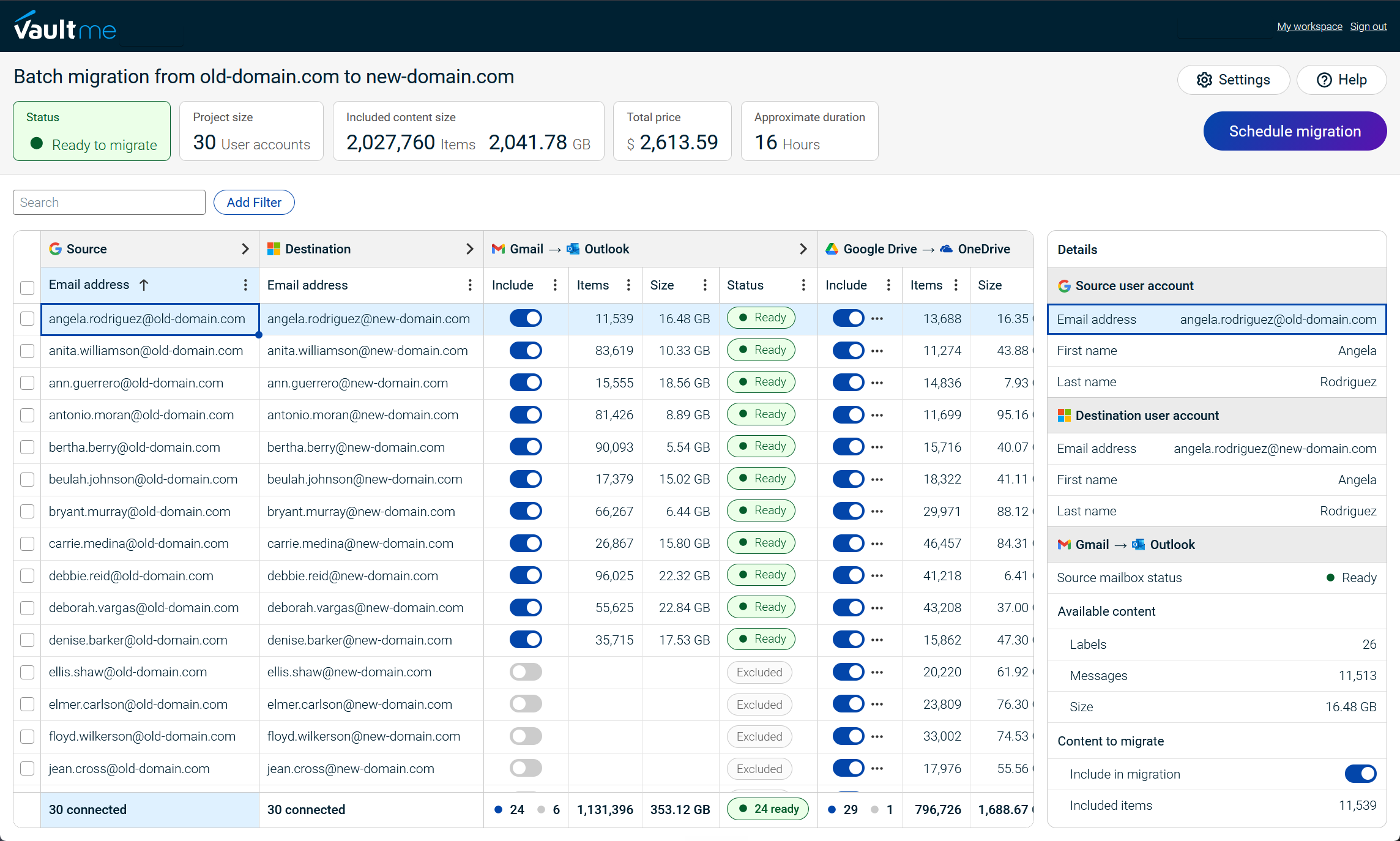
VaultMe focuses on preserving business content in its entirety and delivering the best possible migration experience. For Google Workspace and Microsoft 365 accounts, it supports migration of email, files, contacts, and calendars.
VaultMe emphasizes migration preparation and validation, helping administrators identify potential issues before the migration begins.
Key strengths
- Specialized tool for Google Workspace and Microsoft 365 migrations.
- Designed with the business content preservation philosophy in mind.
- Strong focus on migration preparation and validation.
- Journey-based documentation, in-product guidance, context-aware AI assistance, and human support.
Tradeoffs
- Narrower scope. VaultMe may not be the best fit for migrations requiring extensive support for legacy Exchange environments, on-premises servers, or collaboration workloads outside Google Workspace and Microsoft 365.
Customer feedback
Read verified VaultMe user reviews on Capterra.
MigrationWiz
Best for
MigrationWiz works best for large-scale enterprise migrations where experienced administrators need a highly configurable migration platform.
BitTitan's MigrationWiz is designed to support a broad range of migration scenarios rather than optimizing for a specific migration workflow. Its extensive configuration options allow administrators to tailor migrations to different environments and project requirements. This flexibility has made it a popular choice for enterprise IT teams and managed service providers handling diverse content types.
See how VaultMe compares to MigrationWiz: VaultMe vs BitTitan MigrationWiz.
Key strengths
- Designed for diverse email migration requirements
- Extensive configuration options
- Mature platform with widespread industry adoption
Tradeoffs
- Requires extensive migration expertise
- Configuration can increase project complexity
Customer feedback
Read verified MigrationWiz user reviews on Gartner.
CloudM
Best for
CloudM works best for organizations that need email migration as part of a broader workspace management strategy.
CloudM approaches migration as one component of workspace management rather than as a standalone project. In addition to migration, the platform provides user onboarding and offboarding, directory synchronization, backups, and other administration capabilities, making it suitable for organizations seeking a long-term management solution.
See how VaultMe compares to CloudM: VaultMe vs CloudM.
Key strengths
- Migration integrated with workspace management
- User lifecycle management capabilities
- Ongoing administration features beyond migration
- Suitable for organizations investing in long-term workspace management
Tradeoffs
- Migration is only one part of a broader platform
- Organizations focused solely on migration may not need the additional management capabilities
Customer feedback
Read verified CloudM user reviews on Capterra.
Movebot
Best for
Movebot works best for organizations migrating email as part of larger cloud data migration or consolidation projects involving multiple source platforms.
Movebot is primarily a file migration platform with additional support for mailbox migration. Rather than specializing in email or a particular productivity suite, it focuses on connecting a wide range of cloud platforms, making it useful for organizations consolidating data from multiple sources into a single environment.
See how VaultMe compares to Movebot: VaultMe vs Movebot.
Key strengths
- Broad cloud platform compatibility
- Well-suited to cloud consolidation projects
Tradeoffs
- Broader focus on file migration rather than email migration
- Less optimized for platform-specific email migration workflows
Customer feedback
Read verified Movebot user reviews on Capterra.
MailJerry
Best for
MailJerry works best for small and medium-sized projects that involve migrating only email.
MailJerry is a dedicated email migration tool that emphasizes simplicity. Rather than expanding into workspace management or supporting a wide range of migration scenarios, it focuses on providing a straightforward migration experience for organizations whose primary objective is to transfer only email.
Key strengths
- Focused exclusively on mailbox migration
- Has a free basic plan
Tradeoffs
- Does not support migrations of files and other types of content
- Requires download and installation
- A subscription-based pricing model, which is only suitable for organizations migrating email regularly
Customer feedback
Read verified MailJerry user reviews on Capterra.
How to select an email migration tool
When deciding between free migration tools and paid third-party migration solutions, consider the following factors.
Project size
Different tools are optimized for different project sizes. Some prioritize straightforward setup for small and medium-sized migrations, while others are designed for large enterprise projects with hundreds or thousands of mailboxes. Choosing a tool that matches the scale of your migration can reduce the administrative effort.
Support for other types of business content
Email is often only one part of a migration project. Organizations may also need to migrate calendars, contacts, files, as well as shared mailboxes and files. If multiple content types need to be transferred, consider whether a single migration tool can handle the entire project or if separate tools will be required.
Cloud-based vs. desktop software
Some migration tools run entirely in the cloud, while others require software to be installed on a local computer or server. Cloud-based solutions eliminate the need to maintain migration infrastructure and allow migrations to continue without keeping a workstation online.
Preparation vs. troubleshooting
Migration tools differ significantly in how they handle potential issues. Some emphasize preparation by validating accounts, permissions, and migration settings before the migration begins. Others focus more on reporting and troubleshooting issues after they occur. Organizations looking to minimize migration risk should consider how much effort a tool invests in preventing problems before migration.
Learning curve and the team's experience
Some tools are designed for experienced migration specialists and provide extensive configuration options. Others guide administrators through the migration setup process with context-aware suggestions and AI assistance. When making a decision, consider the experience of the team performing the migration.
Pricing model
Email migration tools use different pricing models, including per-user licenses, subscriptions, and usage-based pricing. The licensing approach can have a significant impact on overall project costs, particularly for large migrations or organizations that perform migrations regularly.
When evaluating a migration tool, consider not only the upfront cost but also whether the pricing model matches the size, scope, and frequency of your migrations. A lower license cost does not always translate into a lower overall project cost if it increases the time and effort required to complete the migration.
Email migration tools comparison table
| Criteria | VaultMe | MigrationWiz | CloudM | Movebot | MailJerry | Native tools |
|---|---|---|---|---|---|---|
| Recommended project size | Small to mid-sized (roughly 5–500 accounts) | Large enterprise projects | Mid-sized to enterprise projects | Small to enterprise projects | Small to mid-sized projects | Small to large cost-sensitive projects |
| Specialization | Google Workspace and Microsoft 365 migrations | Microsoft 365 migrations | Workspace management | Multi-cloud file migration | Email migration | Email migration |
| Migration experience assumed | Beginner to intermediate | Advanced | Intermediate | Intermediate | Beginner to intermediate | Intermediate to advanced |
| Support for other types of business content | Supports migrations of other types of content (files, contacts, calendars) in one workflow | Supports migrations of other types of content (files, contacts, calendars) in separate workflows | Supports migrations of other types of content (files, contacts, calendars) in one workflow | Supports other types of content (files, contacts, calendars) in separate workflows | Not supported | Multiple tools required |
| Download and installation | Not required | Not required | Not required | Not required | Required | Required for some tools |
| Support for personal accounts | Fully supported | Focus on business accounts | Focus on business accounts | Focus on business accounts | Supported | Limited support |
| Support options | Documentation built around a user journey. In-app instructions and suggestions. Context-aware AI assistance. Human support. | Extensive technical documentation built around features. Human support. | Documentation built around features. Human support. | Documentation built around features. Human support. | Documentation built around features. Human support. | Documentation built around features. Community forums. |
| Pricing model | No-license approach; per-user and per-usage pricing | Per-user licenses | Per-user and per-usage licenses | No-license approach; per-user or per-usage pricing | Subscription-based model | Free |
How we compared email migration tools
Our team has hands-on experience with every migration tool included in this comparison. We evaluated each product from an administrator’s perspective, focusing on how the product approaches migration, not simply which features it lists.
We considered the setup process, the amount of migration knowledge assumed, the guidance provided during configuration, how potential problems are identified, and the overall workflow used to complete a migration.
Because migration requirements differ, we have not assigned a universal score or ranked the tools from best to worst. Instead, we identify the type of project and administrator each product appears best designed to support.

Conclusion
The best email migration tool depends on the project, the administrator’s experience, and the type of workflow the organization prefers. Native tools may be sufficient for straightforward, cost-sensitive migrations, while dedicated third-party platforms generally provide more guidance, flexibility, and support.
Our hands-on experience showed that each third-party tool approaches migration differently. MigrationWiz emphasizes configuration and administrator control; CloudM connects migration with broader workspace management; Movebot provides a platform-neutral approach to cloud data transfers; and MailJerry offers a focused workflow for email-only projects.
VaultMe is best suited to organizations migrating approximately 5–500 accounts to Google Workspace or Microsoft 365 that want a guided, preparation-first experience. Its workflow is designed to reduce migration uncertainty through pre-migration checks, contextual guidance, and support for transferring email, files, contacts, and calendars together.
Rather than selecting a tool based only on its feature list, consider how well its approach matches your team’s expertise, project scope, and need for preparation, control, and validation. The right tool is the one that helps your team complete its particular migration reliably and with a manageable level of administrative effort.
Related articles
Can't select an IMAP migration tool? Explore your options: Best IMAP Migration Tools for Businesses.
Need a tool for your Microsoft 365 migration? Learn about different tools and how to choose one for your specific situation: Best Microsoft 365 Migration Tools for IT Administrators.
Need to perform a Google Workspace migration? Learn what tools are available and choose the one for your project: Best Google Workspace Migration Tools for IT Administrators.
Planning a migration to Google Workspace? See VaultMe's guide: How to Migrate to Google Workspace.
Need to transfer the company's user accounts to Microsoft 365? See this article for instructions: How to Migrate to Microsoft 365.
Looking for a Movebot alternative? VaultMe explains your options: Best Movebot Alternatives for Google Workspace Migrations.
Need to transfer users from Google Workspace to Microsoft 365? Learn how you can do that effectively: Best Way to Migrate Users from Google Workspace to Microsoft 365.
Need to transfer email accounts to Office 365? Learn what options are available: Best Way to Migrate Email Accounts to Office 365.
Can't choose between a paid and free tool for Google Workspace email migration? Learn what needs to be considered: Best Way to Migrate Email to Google Workspace.