Best CloudM Alternatives for Google Workspace Migration
CloudM is a strong candidate for complex Google Workspace migrations, particularly when migrating content is part of a broader workspace management strategy. CloudM Migrate supports business-critical migration projects, while CloudM’s wider offering covers ongoing areas such as backup, archiving, user lifecycle management, and business continuity.
That broader scope will not suit every organization. Some businesses need a focused migration tool for a project with a clear beginning and end. Others may prioritize a guided self-service workflow, extensive administrator control, high-volume file transfers, or a straightforward migration using Google’s own services.
The best CloudM alternative therefore depends less on which product has the longest feature list and more on how each product approaches the work. Important considerations include how the project is prepared, who is expected to manage it, whether migration is the product’s main specialization, and what happens after the transfer is complete.
This guide compares four leading CloudM alternatives for Google Workspace migration:
- VaultMe for focused, guided migrations involving Google Workspace and Microsoft 365
- MigrationWiz for configurable projects run by experienced IT teams and migration providers
- Movebot for file-heavy and multi-cloud data transfers
- Google’s native migration services for straightforward migrations into Google Workspace
CloudM remains an appropriate choice for many complex enterprise projects. The purpose of this comparison is not to identify a universally better platform, but to show which migration philosophy and workflow best match each type of project.
- What is CloudM, and when is it the right choice?
- Why consider a CloudM alternative?
- CloudM alternatives at a glance
- How we evaluated the CloudM alternatives
- 1. VaultMe: Best for focused, guided Google Workspace migrations
- 2. MigrationWiz: Best for configurable, workload-oriented projects
- 3. Movebot: Best for file-heavy and multi-cloud migrations
- 4. Google’s native services: Best for straightforward Google Workspace migrations
- CloudM alternatives compared by workflow and project fit
- Which CloudM alternative should you choose?
- Frequently asked questions
- Related articles
What is CloudM, and when is it the right choice?
CloudM is a broader cloud workspace management platform. CloudM Migrate is the part of its offering used to move users and business data into Google Workspace or Microsoft 365. The larger CloudM portfolio supports ongoing work such as backup, archiving, offboarding, workspace administration, and business continuity.
This distinction is important when comparing CloudM with alternative migration products. CloudM approaches migration as one stage of a wider workspace transformation or management program. Its workflow is designed for organizations that need extensive planning, administrative control, deployment flexibility, and access to migration specialists.
CloudM can be a particularly good fit when:
- The migration is large or technically complex.
- The organization is moving from a legacy platform or managing an unusual migration path.
- Enterprise IT teams need granular control over migration scope and configuration.
- Hosted, self-hosted, or professionally delivered migration options are required.
- The project includes complex collaboration data.
- Migration is part of a longer-term Google Workspace management strategy.
- The organization prefers a sales-led consultation.
For these projects, CloudM’s breadth is an advantage. The same vendor relationship can extend beyond migration into the ongoing management and protection of Workspace data.
However, that operating model may be broader than necessary for an organization that only needs to complete a defined migration. A small or mid-sized business may prefer a self-service workflow that can be evaluated and configured without an initial sales process. A migration provider may want a tool optimized for repeatable workload projects, while a file-heavy project may call for a platform built primarily around high-volume data transfer.
The case for a CloudM alternative is therefore usually about project fit, not a lack of capability. The central question is whether migration should be part of a wider workspace management engagement or treated as a focused project with its own clear outcome.
Why consider a CloudM alternative?
A CloudM alternative may be worth considering when:
- Migration is a standalone project. The organization needs to migrate a defined set of accounts and business content, but does not require ongoing backup, archiving, offboarding, or workspace management from the same provider.
- A guided self-service process is preferred. Administrators who do not perform migrations regularly may benefit from a workflow that explains each stage, checks project readiness, and identifies common configuration problems before anything is transferred.
- The team wants to evaluate the project before contacting sales. Some migration tools allow administrators to create an account, connect the source and destination, and assess the migration through a self-service process.
- Files are the main concern. A project involving large data volumes, several storage platforms, or complex file mappings may fit a tool that specializes in scalable file movement rather than broader workspace administration.
- Experienced administrators want workload-level control. Migration specialists and managed service providers may prefer to configure mailbox, document, and other workloads separately, especially when they manage projects across several source and destination systems.
- Google’s own migration services cover the requirements. When a source platform and content type match a supported Google migration path, an internal IT team may decide that a third-party migration platform is unnecessary.
- Personal accounts are involved. Businesses moving from personal Gmail or Microsoft accounts into a managed Workspace environment should consider whether a platform treats these as fully supported migration scenarios rather than limited email imports.
The most suitable alternative will depend on what the organization wants to simplify. One team may want less procurement and project design. Another may need more guidance, greater configuration freedom, or stronger specialization in file transfer.
For that reason, CloudM alternatives should be compared by the experience they create for the migration team, not simply by the number of platforms, settings, or content types listed on a product page.
CloudM alternatives at a glance
Each CloudM alternative is built around a different idea of how migration work should be organized. The table below compares their operating models rather than treating them as interchangeable products.
| Tool | Specialization | Migration philosophy | Best project fit | Key differentiator |
|---|---|---|---|---|
| VaultMe | Google Workspace and Microsoft 365 migrations | Prepare thoroughly, identify potential issues early, and move related business content through one guided journey | Focused migrations of approximately 5–500 accounts, including projects involving personal accounts | A preparation-first, self-service workflow designed around a migration with a clear scope and outcome |
| MigrationWiz | Mailbox-led and workload-specific migrations across varied business systems | Give experienced administrators flexibility to configure and operate separate migration projects | IT teams and migration providers running repeatable or highly customized projects | Workload-oriented project control for administrators managing different migration environments |
| Movebot | High-volume file and data transfers across cloud and on-premises platforms | Scan, map, transfer, and synchronize data efficiently across systems | File-heavy migrations, multi-cloud consolidation, and projects involving broad storage-platform coverage | A data-movement model centered on file scale, transfer speed, and source-platform breadth |
| Google’s native migration services | Supported migrations into Google Workspace | Make migration an administrator-managed part of adopting Google Workspace | Straightforward inbound projects that closely match a documented Google migration path | Migration can be completed without purchasing a separate third-party platform |
| CloudM Migrate | Complex migrations within a broader cloud workspace management offering | Plan and control migration as part of a larger enterprise workspace program | Large, complex, or business-critical projects that may require expert services and ongoing Workspace management | Migration can form part of a continuing relationship covering governance, protection, and administration |
How we evaluated the CloudM alternatives
The alternatives in this guide were evaluated according to the type of migration experience they create. The comparison does not assign points for individual features because a capability is only valuable when it supports the project’s actual requirements.
Instead, the evaluation considers five areas:
- Workflow. How does the administrator move from initial evaluation and preparation to launch, monitoring, and completion? Some products provide a guided journey, while others expect the administrator to assemble and manage the process.
- Project fit. Is the product designed for a finite migration, repeatable service-provider work, high-volume data movement, or a broader workspace transformation?
- Specialization. Does the vendor concentrate on Google Workspace and Microsoft 365, mailbox migration, file transfers, or continuing workspace management? Specialization affects both the product’s priorities and the types of migration knowledge built into its workflow.
- Migration philosophy. Does the platform emphasize preparation, completeness, configuration, transfer efficiency, or administrator ownership? Products that support similar systems can still produce very different project experiences.
- Expected administrator. Is the workflow intended for an occasional administrator, an experienced migration specialist, an MSP, or an enterprise IT team working with professional services?
These criteria help distinguish products that might look similar in a conventional comparison. For example, two platforms may both migrate email and files into Google Workspace, but one may treat them as parts of a single business-content migration while the other treats them as separately configured workloads.
The recommendations that follow are therefore based on best-fit scenarios rather than an overall ranking. Each alternative has a meaningful differentiator, and CloudM may remain the strongest choice when its enterprise operating model matches the organization’s needs.
1. VaultMe: Best for focused, guided Google Workspace migrations
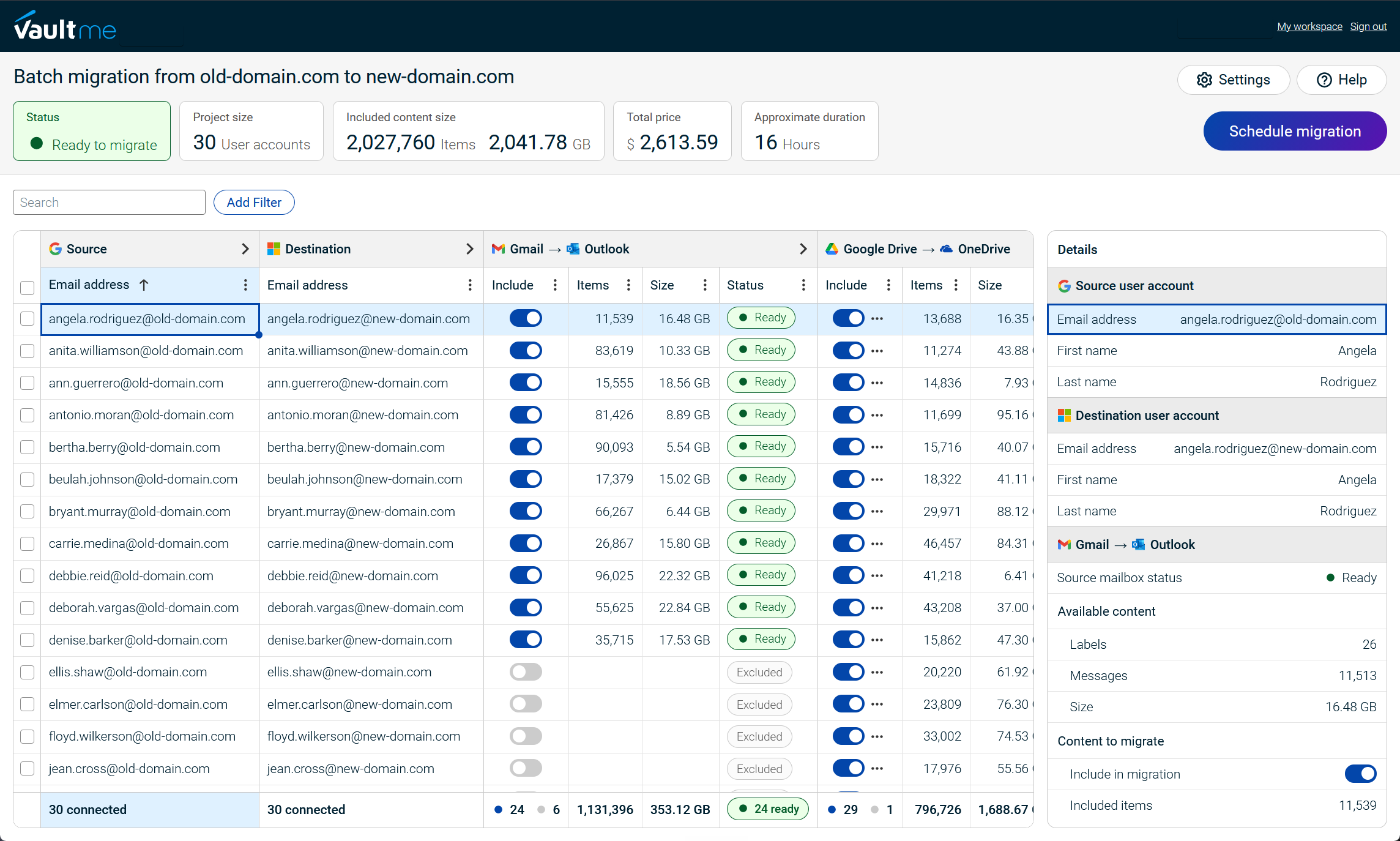
VaultMe is a focused migration tool for projects involving Google Workspace and Microsoft 365. Unlike CloudM’s broader workspace management model, VaultMe is designed around completing a migration with a defined scope and outcome.
Its workflow places preparation before execution. Administrators connect the source and destination environments, configure the accounts to be migrated, and review readiness checks before starting the transfer. These checks are intended to identify access, storage, licensing, and configuration issues early, when they are easier to resolve.
VaultMe also treats a user’s business content as a connected whole. Email, files, calendars, and contacts can be prepared, migrated, and monitored through one coordinated workflow instead of being managed as unrelated projects. Its migration philosophy prioritizes preserving business content as completely and predictably as possible.
The platform is best suited to small and mid-sized projects of approximately 5–500 accounts. It can be used by experienced IT professionals, but its guided setup, migration playbooks, contextual instructions, context-aware AI assistance, and human support are also designed for administrators who do not perform migrations regularly.
VaultMe’s key differentiator
VaultMe’s main differentiator is a preparation-first, self-service journey built specifically around migration. Organizations can begin configuring and evaluating a project without first entering a sales-led workspace management engagement.
Choose VaultMe when:
- The project involves Google Workspace or Microsoft 365.
- Migration is a finite project rather than part of a broader workspace management program.
- Approximately 5–500 accounts need to be migrated.
- Email, files, calendars, and contacts should be managed together.
- The administrator wants readiness issues identified before the migration starts.
- Personal Gmail or Microsoft accounts are part of the project.
- A guided workflow is important to a team with limited migration experience.
VaultMe is less suitable when the organization needs to migrate from a wide range of unrelated legacy systems, operate migration infrastructure within its own environment, or purchase ongoing backup and workspace governance services from the same platform. In those situations, CloudM’s broader enterprise model may be a better fit.
For more information on how VaultMe compares to CloudM, see VaultMe vs CloudM.
To learn more about how VaultMe can help you with your Google Workspace project, see Migrate to Google Workspace.
Read VaultMe's verified reviews on Capterra: VaultMe reviews.

2. MigrationWiz: Best for configurable, workload-oriented projects
MigrationWiz is a cloud migration platform commonly used by experienced IT teams and managed service providers. It specializes in Microsoft 365 migrations and additionally supports Google Workspace, Exchange, IMAP, and other business migration scenarios.
Its operating model differs from CloudM’s wider workspace management approach. MigrationWiz is centered on configuring and running migration projects rather than extending the relationship into ongoing backup, governance, or user lifecycle management.
MigrationWiz generally organizes work by types of content. Mailboxes, documents, personal archives, and other supported content require separate project configuration and licensing. This gives administrators flexibility to design the migration around specific requirements, but it also places more responsibility on the migration team to coordinate the complete project.
The platform is particularly relevant to MSPs and specialists that already use a repeatable process across different clients and environments. These teams may value the ability to select migration types, apply project-specific settings, and manage different workloads according to their own methodology.
MigrationWiz’s key differentiator
MigrationWiz’s main differentiator is its workload-oriented operating model. It gives experienced administrators a configurable framework for building migrations across varied source and destination systems.
Choose MigrationWiz when:
- The migration team manages projects across Microsoft 365, Exchange, Google Workspace, and other systems.
- Mailbox migration is a central part of the project.
- Administrators want detailed control over how individual workloads are configured.
- Separate mailbox and document projects fit the migration plan.
- The team has the experience to plan, coordinate, and troubleshoot the project.
MigrationWiz may be less suitable when the administrator wants email, files, calendars, and contacts presented as one guided migration journey. Teams should also identify the required project types and licenses before purchasing so that the full scope of the migration is understood.
Compared with CloudM, MigrationWiz is a more focused migration platform, but it is not necessarily a simpler one. It is best viewed as an alternative for teams that want to control the migration methodology themselves rather than connect migration to a broader workspace management program.
For a more detailed discussion, see Best MigrationWiz Alternatives for Business Email Migration.
3. Movebot: Best for file-heavy and multi-cloud migrations
Movebot is a cloud migration platform with a strong emphasis on moving files across a broad range of cloud storage and on-premises systems. It also supports mailbox migrations involving email, calendars, and contacts.
Its workflow follows a data-movement model. This approach is particularly useful when the central challenge is transferring a large volume of files efficiently while preserving structures, permissions, and relevant metadata.
Movebot differs from CloudM in both scope and philosophy. CloudM Migrate is designed for complex migrations that may belong to a wider workspace management program. Movebot is more directly centered on moving data between systems, particularly when a project crosses multiple storage platforms.
This makes Movebot relevant to MSPs and organizations consolidating services such as Google Workspace, Microsoft 365, Dropbox, Box, Egnyte, or on-premises storage.
Movebot’s key differentiator
Movebot’s main differentiator is its file-led, multi-platform migration model. It is designed for projects where data volume, storage-system coverage, and efficient transfer matter more than deep specialization in one productivity ecosystem.
Choose Movebot when:
- Files represent the largest or most complex part of the migration.
- The project includes several cloud storage or on-premises platforms.
- High data volume is a major planning consideration.
- An MSP needs one data-transfer platform for varied customer environments.
- Volume-based pricing fits the way the project is scoped.
Movebot may be less suitable when the organization wants a guided Google Workspace migration journey that treats email, files, calendars, and contacts as one connected set of business content. Although Movebot supports mailbox migration, its clearest specialization remains broad file and data movement.
Compared with CloudM, Movebot provides a more focused transfer platform rather than a continuing workspace management offering. It is a strong alternative when the migration problem is primarily about getting large or varied data sets from one system to another.
For a more detailed comparison, see Best Movebot Alternatives for Google Workspace Migrations.
4. Google’s native services: Best for straightforward Google Workspace migrations
Google provides native data migration and import services for several common migration paths into Google Workspace. These services are available through Google’s administrative environment, so organizations may not need to purchase a separate third-party migration tool.
The native approach places responsibility for the project primarily on the organization’s internal IT team. Administrators select the appropriate Google service for the source platform and content involved, prepare both environments, configure the migration, monitor its progress, and resolve any exceptions.
This can work well when the migration closely matches a path documented by Google. Depending on the source, Google provides processes for importing content such as email, calendars, contacts, files, permissions, users, and certain collaboration data. Support varies by source and content type, so administrators must confirm that the complete project, and not only its mailbox component, fits the relevant service.
Google’s native services differ substantially from CloudM’s operating model. CloudM offers a dedicated migration product, access to migration specialists, and the possibility of continuing into broader workspace management. Google’s services make migration an administrator-led part of adopting or consolidating Google Workspace.
Google’s key differentiator
The principal differentiator is that the migration can be performed within the Google Workspace environment without procuring a separate third-party platform.
Choose Google’s native services when:
- The destination is Google Workspace.
- The source platform has a documented Google migration path.
- The required content types are supported for that path.
- The migration is relatively straightforward.
- Minimizing additional software costs is a priority.
- Internal IT has the time and experience to prepare, monitor, and troubleshoot the project.
- Managing different content types through separate processes is acceptable.
Google’s services may be less suitable for complex Google Workspace to Google Workspace projects, unusual source systems, or migrations that require a unified workflow and dedicated guidance. They may also require more administrator coordination when different content types are handled through different services.
Compared with CloudM, Google’s native option offers a narrower relationship and a more administrator-owned process. It is most compelling when the project requirements fit Google’s documented paths closely enough that the additional structure of a third-party migration platform is unnecessary.
CloudM alternatives compared by workflow and project fit
The products in this comparison can support overlapping migration scenarios, but they organize the work differently. The following table focuses on how each platform fits into a project rather than comparing individual capabilities.
| Criterion | CloudM Migrate | VaultMe | MigrationWiz | Movebot | Google’s native services |
|---|---|---|---|---|---|
| Role of migration | One part of a broader workspace management offering | A focused project with a defined scope and outcome | A set of configurable migration workloads | A data-transfer project between storage and collaboration systems | An administrative process for bringing data into Google Workspace |
| Typical workflow | Configure the environment, execute, monitor, and optionally involve specialists | Connect accounts, prepare the project, resolve readiness issues, launch, and monitor related content together | Create projects for each type of content involved, configure endpoints and users, purchase licenses, run, and troubleshoot | Create projects for each type of content involved, transfer, and monitor each project separately | Select a supported Google service, prepare the environments, configure the import, and administer each process |
| Best project fit | Complex, large-scale, or business-critical migrations | Focused Google Workspace and Microsoft 365 migrations of approximately 5–500 accounts | Repeatable or customized migrations run by experienced teams | File-heavy, high-volume, or multi-cloud data movements | Straightforward migrations into Google Workspace that match a documented path |
| Specialization | Complex cloud migration and continuing workspace management | Guided migration of business content within the Google and Microsoft ecosystems | Mailbox-led and workload-specific migration across varied business environments | Files and data movement across broad cloud and on-premises sources | Supported imports into Google Workspace |
| Migration philosophy | Use planning, control, and expert delivery to manage complex transformation | Prepare thoroughly and preserve related business content as completely and predictably as possible | Give administrators control over separately configured migration workloads | Move large and varied data sets efficiently between systems | Let internal administrators manage supported migrations within the destination platform |
| Expected administrator | Enterprise IT, migration specialists, or teams working with professional services | Occasional or experienced administrators, internal IT teams, and service providers | Experienced IT administrators and MSPs | MSPs and IT teams comfortable managing data-transfer projects | Google Workspace administrators with sufficient internal time and expertise |
| Engagement model | Commonly begins with consultation, scoping, or a quote | Self-service evaluation and setup, with guidance and support available | Self-service project configuration and license purchasing | Self-service setup, with sales and migration support available | Admin-led setup within Google Workspace |
| After the migration | The relationship can continue through backup, governance, offboarding, and other workspace management services | The migration concludes as a defined project | The migration concludes as a defined project | The migration concludes as a defined project | Ongoing administration remains within Google Workspace |
| Key differentiator | Migration can form part of a continuing enterprise workspace strategy | A guided, preparation-first journey for a focused migration | Configurable workload projects across varied environments | A file-led model built for broad and high-volume data movement | No separate third-party migration platform is required |
| Primary trade-off | Its wider enterprise model may exceed the needs of a focused project | Narrower source-platform coverage than broad enterprise tools | More coordination and migration knowledge may be required | Less focused on a unified Google Workspace business-content journey | Narrower migration paths and greater reliance on internal administration |
Capabilities and workflows can vary according to the source platform, destination, content type, license, and project configuration. Organizations should confirm that a product supports their complete migration path before selecting it.
The most important distinction is whether migration is being treated as an enterprise workspace initiative, a focused business-content project, a set of technical workloads, a high-volume data transfer, or an administrator-managed import. Once that question is answered, the shortlist usually becomes much clearer.
Which CloudM alternative should you choose?
Choose the platform whose operating model matches the project:
- Choose VaultMe for a guided, preparation-first migration of approximately 5–500 Google Workspace or Microsoft 365 accounts. It is especially relevant when related business content should be managed together or personal accounts are involved.
- Choose MigrationWiz when experienced administrators or MSPs want configurable, workload-specific projects across varied environments.
- Choose Movebot when files, transfer volume, or support for multiple storage platforms drives the migration.
- Choose Google’s native services for a straightforward migration into Google Workspace that matches a documented path and can be managed by internal IT.
- Choose CloudM when migration is complex, requires specialist support or deployment flexibility, or forms part of a broader workspace management strategy.
The best option is determined by project fit, administrator experience, and migration philosophy, not by the length of a product’s feature list.
Frequently asked questions
What is the best CloudM alternative for Google Workspace migration?
There is no universal best alternative. VaultMe suits guided, focused migrations; MigrationWiz fits experienced teams that want configurability; Movebot is strongest for file-heavy projects; and Google’s native services may cover straightforward inbound migrations.
Is VaultMe a direct replacement for CloudM?
Not in every scenario. VaultMe focuses on completing Google Workspace and Microsoft 365 migrations, while CloudM combines migration with broader workspace management. VaultMe is more relevant when migration is a defined project rather than part of an ongoing management program.
Which CloudM alternative is best for smaller migrations?
VaultMe is designed for focused projects of approximately 5–500 accounts. Its guided workflow can suit administrators who do not perform migrations regularly.
Which CloudM alternative is best for MSPs?
MigrationWiz may suit MSPs that want configurable, workload-specific projects. Movebot is relevant to providers managing file-heavy migrations across many platforms. VaultMe can fit providers specializing in guided Google Workspace and Microsoft 365 projects.
Can Google’s native services replace CloudM?
They may be sufficient when the destination is Google Workspace and the project closely matches a supported Google migration path. Complex projects may still benefit from a dedicated platform and migration support.
Should an organization replace CloudM if it needs ongoing Workspace management?
Probably not. CloudM is particularly well suited when migration connects to continuing backup, governance, offboarding, or other workspace management requirements.
Related articles
Need to perform a Google Workspace migration? Learn what tools are available and choose the one for your project: Best Google Workspace Migration Tools for IT Administrators.
Can't choose a tool for your mailbox migration project? Learn what tools exist and which works best in your scenario: Best Email Migration Tools and Services for IT Admins.
Need to migrate users from one Google Workspace to another? VaultMe's guide provides helpful recommendations: Migrate Google Workspace Users Between Domains.
Need to archive former employees' accounts? Use VaultMe's article for guidance: How to Archive Multiple Former Employee Accounts.
Can't choose a migration tool for your small business? Learn what needs to be accounted for: Best Migration Tools for a Small Company IT Team: 4 Options Compared.
Need to migrate from personal Gmail accounts to Google Workspace? Learn how an organization can approach this process: Migrate Personal Gmail Accounts to Google Workspace.