Best Microsoft 365 Migration Services for Mid-Sized Businesses
Mid-sized businesses typically need more than a basic data-transfer utility but less complexity than an enterprise migration platform. For organizations migrating dozens to several hundred user accounts, the best Microsoft 365 migration service should provide reliable content copying and sufficient administrator guidance without requiring a dedicated migration team.
The right service also depends on the project. A Google Workspace-to-Microsoft 365 migration has different requirements from a Microsoft 365 tenant-to-tenant migration, a merger or acquisition, or the transfer of employees from personal Microsoft accounts into a business tenant. The content involved may include email, OneDrive files, calendars, contacts, and, in more complex projects, other types of content.
This guide compares Microsoft 365 migration services suited to mid-sized businesses. We evaluate their supported scenarios, preparation process, ease of use, pricing approach, support, and ideal project size.
For organizations migrating approximately 50–500 accounts and focusing on core employee content, VaultMe is a strong self-service option. It is designed for IT administrators who want a guided, preparation-first workflow for migrating email, files, calendars, and contacts.
Businesses with complex identity, coexistence, SharePoint, Teams, or enterprise-scale requirements may be better served by a broader migration platform or a managed migration provider.
- What to look for in a Microsoft 365 migration service
- How we evaluated Microsoft 365 migration services
- Microsoft 365 migration services compared
- VaultMe: Best for guided Microsoft 365 migrations
- MigrationWiz: Best for experienced IT teams needing flexibility
- CloudM: Best for migration and ongoing user lifecycle management
- Movebot: Best for file-heavy migrations from multiple platforms
- Which Microsoft 365 migration service is best for your business?
- Frequently asked questions about Microsoft 365 migration services
- What is the best Microsoft 365 migration service for a mid-sized business?
- Can VaultMe perform Microsoft 365 tenant-to-tenant migrations?
- Can a Microsoft 365 migration be completed without downtime?
- Should a mid-sized business use migration software or a managed provider?
- Are Microsoft’s native migration tools enough?
- Related articles
What to look for in a Microsoft 365 migration service
Mid-sized businesses need a migration service that can handle dozens or hundreds of accounts without imposing unnecessary enterprise complexity. The service should match the organization’s project size, platforms, internal expertise, and approach to preserving business content.
Important criteria include:
- Project size and commercial fit: The service should support batch migrations at the required scale without demanding unnecessary infrastructure, licensing commitments, or enterprise-level administration.
- Experience expected from administrators: Look for a guided workflow that explains decisions, translates technical issues, and provides actionable next steps, especially if the IT team does not employ migration specialists.
- One workflow for supported business content: Migrating email, files, calendars, and contacts through one coordinated workflow reduces repeated setup and makes progress easier to monitor.
- Default migration scope: Consider whether the service prioritizes preserving complete business content or expects administrators to define filters, exclusions, and migration rules.
- Preventive pre-migration checks: Effective checks should identify problems involving access, authentication, permissions, destination readiness, licenses, and storage before migration begins.
- Focus on relevant platforms: A service optimized for Microsoft 365, Google Workspace, Exchange, and IMAP may offer more relevant guidance than a broader platform with configuration options the business does not need.
- Post-migration verification: Look for per-user and item-level reporting that shows what migrated, where it arrived, what was skipped, why an issue occurred, and what action may resolve it.
The best Microsoft 365 migration service for a mid-sized business is not necessarily the one with the longest feature list. It is the one whose standard workflow fits the project, preserves the required business content, and allows the internal IT team to complete and verify the migration successfully.
How we evaluated Microsoft 365 migration services
We evaluated each service using the same criteria: supported migration scenarios, suitability for approximately 50–500 accounts, preparation and validation features, ease of administration, reporting, support, and pricing model. The comparison is based on publicly available product documentation and information available during our most recent review.
VaultMe publishes this guide and is one of the services evaluated. To keep the comparison transparent, we identify both the projects for which VaultMe is a strong choice and the situations in which another provider may be more suitable. Features and pricing can change, so businesses should confirm critical requirements directly with each provider.
Microsoft 365 migration services compared
| Evaluation criterion | VaultMe | MigrationWiz | CloudM | Movebot |
|---|---|---|---|---|
| Project size and commercial fit | Designed for small and mid-sized migrations of roughly 5–500 accounts, with self-service setup and usage-based pricing | Suited to mid-sized and enterprise projects where broad workload support and specialist configuration are required | Suited to mid-sized and enterprise organizations that need migration alongside broader user-management capabilities | Supports projects of various sizes, particularly data-volume-driven file migrations |
| Experience expected from administrators | Designed for administrators with little or no migration experience; provides contextual guidance and recommended next steps | Offers extensive flexibility but generally assumes prior migration knowledge | Generally assumes workspace-administration or migration experience; managed services are also available | Generally assumes that administrators understand migration planning and configuration |
| One workflow for supported business content | Handles supported email, files, calendars, and contacts through one coordinated workflow | Manages different content types as separate workloads or projects | Can handle email, files, calendars, and contacts in one workflow | Uses distinct workflows for file and mailbox migrations |
| Default migration scope | Prioritizes preserving supported business content as completely as possible without requiring extensive filtering decisions | Provides granular control over migration scope, filters, settings, and project configuration | Provides broad control over scope, filters, settings, and project structure | Allows administrators to configure the scope of file and mailbox transfers |
| Pre-migration checks | Runs extensive checks for access, permissions, account configuration, licenses, destination readiness, and storage; provides corrective guidance | Includes connection testing, while broader assessment and validation depend on the workload and project configuration | Includes connection testing, with additional assessment and planning options available | Assesses source data and connections, with additional optional validation depending on the migration workflow |
| Focus on relevant platforms | Optimized for Google Workspace and Microsoft 365, with additional support for Exchange, IMAP, and personal accounts | Strong roots in Microsoft 365, with support for Google Workspace, Exchange, IMAP, and additional workloads and endpoints | Strong roots in Google Workspace, with support for Microsoft 365 and broader cloud-management requirements | Supports numerous cloud storage platforms, with additional mailbox-migration capabilities |
| Post-migration verification | Provides per-user and item-level reporting showing migration results, source and destination locations, reasons for skipped items, and suggested resolutions | Provides project logs and migration results for investigating errors and exceptions | Provides migration reporting, with the available detail depending on the project and service | Provides dashboards and project reporting for reviewing migration results |
| Support | Documentation built around a user journey. In-app instructions and suggestions. Context-aware AI assistance. Human support. | Extensive technical documentation built around features. Human support. | Documentation built around features. Human support. | Documentation built around features. Human support. |
| Pricing approach | Usage-based and user account-based pricing tied to the accounts and content being migrated; no advance migration licenses required | License-based pricing that varies by workload and migration type | License-based or quote-based pricing depending on the products and services required | Pricing may vary based on users, data volume, workloads, and project requirements; no advance migration licenses required |
| Best fit | Mid-sized businesses seeking a guided, preparation-first migration of core employee content | Experienced IT teams and managed service providers that need broad coverage and detailed configuration | Organizations combining migration with ongoing onboarding, offboarding, and user lifecycle management | Businesses carrying out file-heavy migrations across multiple cloud platforms |
Based on these criteria, VaultMe is the strongest fit for mid-sized businesses migrating core employee content without a dedicated migration team. MigrationWiz offers greater flexibility for experienced teams with diverse requirements. CloudM is better suited to organizations combining migration with ongoing user lifecycle management, while Movebot is strongest for file-heavy migrations involving multiple cloud platforms.
VaultMe: Best for guided Microsoft 365 migrations
Best suited for: Mid-sized businesses migrating approximately 50–500 accounts without a dedicated migration specialist.
VaultMe is a cloud-based migration service designed to copy core employee content—including email, OneDrive files, calendars, and contacts—to Microsoft 365. It supports Google Workspace-to-Microsoft 365, Microsoft 365 tenant-to-tenant, IMAP and Exchange migrations, as well as transfers from personal Microsoft and Google accounts to Microsoft 365 Business.
VaultMe’s main differentiator is its preparation-first workflow. Before content copying begins, it checks the source and destination accounts for common problems involving access, permissions, licenses, account configuration, OneDrive provisioning, and available storage. Administrators receive actionable warnings so they can address preventable issues before the migration starts.
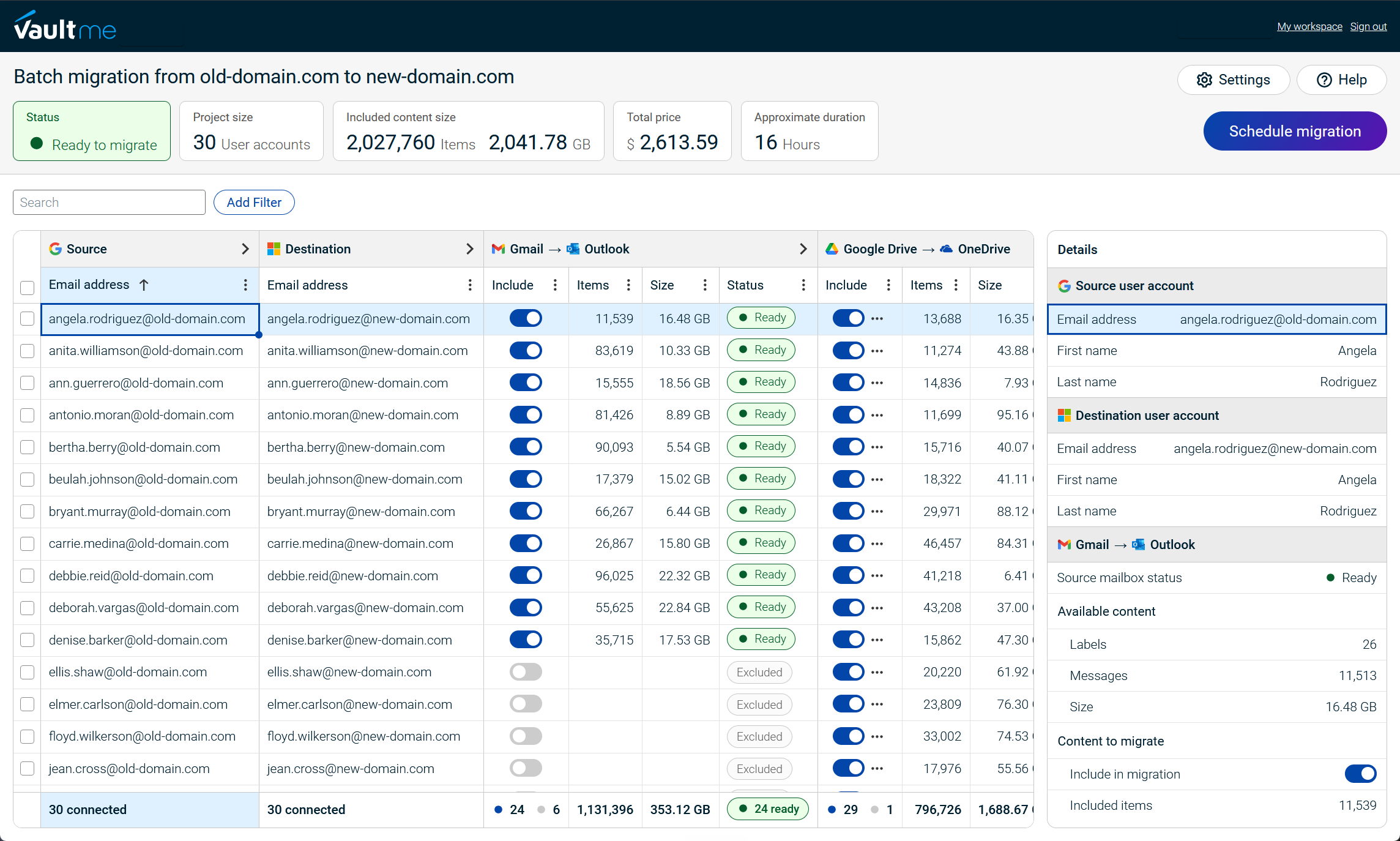
The service combines supported content types within one guided workflow. Administrators can connect accounts, create source-to-destination mappings, review the migration scope and cost, monitor progress, run delta migrations, and examine item-level results without installing software or keeping a local computer online.
Key strengths
- Designed for IT teams with limited migration experience
- Thorough pre-migration checks
- Email, files, calendars, and contacts in one workflow
- Support for business and personal source accounts
- Self-service evaluation before payment
- Usage-based and user account-based pricing without advance license purchases
Important limitations
VaultMe focuses on core employee content. Organizations requiring extensive SharePoint or Teams restructuring, complex identity synchronization, device migration, or prolonged coexistence between environments may need a broader enterprise platform or additional services.
For mid-sized businesses that want to migrate essential Microsoft 365 content with strong preparation and administrator guidance, VaultMe is the best overall fit among the services evaluated in this guide.
Independent customer reviews
MigrationWiz: Best for experienced IT teams needing flexibility
Best suited for: Experienced IT departments and managed service providers handling varied or highly configurable Microsoft 365 migrations.
MigrationWiz, developed by BitTitan, is an established cloud migration platform supporting Microsoft 365, Google Workspace, Exchange, IMAP, public folders, Teams, file systems, and other sources and workloads. Its broad coverage makes it suitable for businesses whose requirements extend beyond a straightforward migration of employee accounts.
The platform offers extensive configuration options, allowing administrators to tailor migration projects to specific workloads and organizational requirements. This flexibility is particularly valuable to migration specialists and managed service providers that perform similar projects regularly.
Key strengths
- Broad support for source platforms and workloads
- Extensive migration configuration options
- Suitable for complex and varied projects
- Established presence among managed service providers
- Supports both mid-sized and enterprise migrations
Important limitations
MigrationWiz generally handles different workloads through separate projects, and the required licenses can vary by migration type. Its numerous configuration options may also create a steeper learning curve for internal IT teams that perform migrations infrequently.
MigrationWiz is a strong choice for mid-sized businesses with experienced administrators and requirements that justify its flexibility. Businesses seeking a more guided workflow for migrating core employee content may find VaultMe easier to prepare, configure, and manage.
Independent customer reviews
CloudM: Best for migration and ongoing user lifecycle management
Best suited for: Mid-sized organizations that want to combine Microsoft 365 migration with ongoing onboarding, offboarding, directory synchronization, and account management.
CloudM is a cloud-based platform that combines data migration with broader user lifecycle management. It supports migrations from numerous source platforms and has particularly strong roots in Google Workspace administration.
Unlike services focused primarily on one-time migration projects, CloudM positions migration as part of an ongoing account-management process. Its broader capabilities can benefit organizations that expect to manage frequent employee transitions or maintain continuing administrative workflows after the migration is complete.
Key strengths
- Migration and user lifecycle management in one platform
- Broad support for source environments
- Onboarding and offboarding capabilities
- Directory synchronization and account-management features
- Suitable for mid-sized and enterprise organizations
Important limitations
CloudM’s broader scope can introduce additional cost and complexity for a business that only needs to complete a one-time Microsoft 365 migration. Its setup may also be better suited to teams with previous migration and workspace-administration experience.
CloudM is a strong choice when migration forms part of an ongoing user-management strategy. For a focused migration of email, OneDrive files, calendars, and contacts, VaultMe may provide a more straightforward and purpose-built workflow.
Independent customer reviews
Movebot: Best for file-heavy migrations from multiple platforms
Best suited for: Mid-sized businesses consolidating files from several cloud storage and productivity platforms into Microsoft 365.
Movebot is a cloud migration platform that supports numerous source environments. Its broad platform coverage makes it particularly useful for organizations moving files from services such as Dropbox, Box, Amazon S3, and other cloud storage systems.
The platform is designed to help administrators assess source data, configure transfers, monitor progress, and identify migration issues. This makes Movebot a practical option for consolidation projects involving large file collections or less common source platforms.
Key strengths
- Broad support for cloud storage platforms
- Strong focus on file and folder migrations
- Suitable for multi-platform consolidation projects
- Options for projects of different sizes
Important limitations
Movebot’s primary strength is file migration. Businesses seeking a unified, guided workflow for complete employee accounts—including email, OneDrive files, calendars, and contacts—should compare its workload support and project structure carefully.
Movebot is a strong choice for file-centered migrations involving diverse source platforms. For mid-sized businesses primarily migrating core employee content from Google Workspace or another Microsoft environment, VaultMe may offer a more focused migration experience.
Independent customer reviews
Which Microsoft 365 migration service is best for your business?
The best Microsoft 365 migration service depends on the content being migrated, the complexity of the project, and the experience of the internal IT team.
Choose VaultMe if your business:
- Is migrating approximately 50–500 accounts
- Needs to copy email, OneDrive files, calendars, and contacts
- Is moving from Google Workspace, Microsoft 365, Exchange, IMAP, or personal Microsoft accounts
- Wants a guided, self-service process with thorough pre-migration checks
- Does not employ dedicated migration specialists
Choose MigrationWiz if you need broad workload support, extensive configuration options, or have an experienced migration team or managed service provider.
Choose CloudM if the migration is part of a broader strategy for ongoing onboarding, offboarding, directory synchronization, and user lifecycle management.
Choose Movebot if the project primarily involves consolidating large file collections from multiple cloud storage platforms.
For a typical mid-sized business migrating core employee content into Microsoft 365, VaultMe offers the most focused balance of preparation, ease of use, content coverage, and administrator guidance. Projects involving complex identity systems, extended coexistence, or extensive SharePoint and Teams requirements may justify a broader enterprise platform.
| Migration service | Best suited for | Important consideration |
|---|---|---|
| VaultMe | Guided migrations of approximately 50–500 accounts involving email, OneDrive files, calendars, and contacts | Focuses on core employee content rather than complex Teams, identity, or coexistence projects |
| MigrationWiz | Experienced IT teams and managed service providers that need broad workload support and extensive configuration options | Different workloads require separate projects and licenses |
| CloudM | Organizations that want migration combined with ongoing onboarding, offboarding, and user lifecycle management | Its broader administration platform may be more than a one-time migration requires |
| Movebot | File-heavy migrations involving numerous cloud storage and productivity platforms | Best known for broad file-migration coverage rather than guided migration of complete employee accounts |

Frequently asked questions about Microsoft 365 migration services
What is the best Microsoft 365 migration service for a mid-sized business?
VaultMe is a strong choice for businesses migrating approximately 50–500 accounts when the project focuses on email, OneDrive files, calendars, and contacts. It combines pre-migration checks, guided setup, delta migrations, monitoring, and item-level reporting in one cloud-based workflow.
Can VaultMe perform Microsoft 365 tenant-to-tenant migrations?
Yes. VaultMe supports Microsoft 365 tenant-to-tenant migrations, including projects in which users move to a new email domain and those in which an existing custom domain is transferred to the destination tenant. Administrators remain responsible for tenant configuration, licensing, domain reassignment, DNS, and identity-related changes.
Can a Microsoft 365 migration be completed without downtime?
Most content can be copied before cutover while employees continue working in their source accounts. Delta migrations can then capture eligible content created or changed after the initial transfer. Some interruption may still occur while administrators change domains, DNS records, mail flow, sign-in details, or connected applications.
Should a mid-sized business use migration software or a managed provider?
A self-service migration platform is usually appropriate when the internal IT team can provision destination accounts, configure Microsoft 365, and manage the cutover. A managed provider may be preferable when the project involves complex identities, hybrid infrastructure, extensive SharePoint or Teams restructuring, regulatory requirements, or limited internal resources.
Are Microsoft’s native migration tools enough?
Microsoft provides native migration capabilities for several workloads, but they are generally configured and managed separately. They may suit organizations with experienced Microsoft 365 administrators and narrowly defined requirements. Businesses seeking one guided workflow, centralized reporting, and migration-specific support may prefer a third-party service.
Related articles
Looking for an email migration tool? Learn what tools are available: Best Email Migration Tools for IT Admins Compared.
Need to migrate from Google Workspace to Microsoft 365? Learn what steps you need to take: Migrate from Google Workspace to Microsoft 365 Step by Step.
Are you an administrator of a small company IT team? Learn what you should consider when choosing a migration tool: Best Migration Tools for a Small Company IT Team: 4 Options Compared.
Need to offboard former employees? Learn how to retain the contents of their user accounts: How to Archive Multiple Former Employee Accounts.